Beer Game

Very busy week ahead. Here I am coding at 2AM in the morning instead of playing StarCraft or something.

Might as well make a quick post before continuing with work.
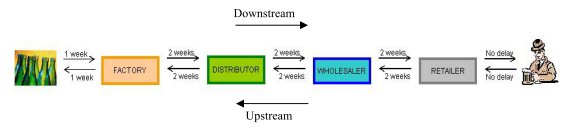
Beer Game

I first heard of the Beer Game in a presentation over at InfoQ. While not involving actual beer (boo!), the simple game provides an interesting glimpse at a certain management dilemma.

This game is played by teams of 4 players, each representing a part of a beer distribution supply chain: Factory, Distributor, Wholesaler, Retailer. The object of the game is to minimize the expenses involved in handing orders, namely the costs for stocking and the expenses caused by unfulfilled back orders.

The “kicker” here is that communication between the players are limited, some variations only allow players to order from each other and nothing else, while some variations of the game only allow the players to see the inventory of the next player in the supply chain.

The common result of this is the bullwhip effect: an oscillating period of over and under-stocking. For example:

  • Retailer receives an order for 10 cases of beer. To anticipate for future orders, he orders 20 cases of beer from the Wholesaler.
  • Having received an order for 20 cases of beer, the Wholesaler orders 40 cases of beer.
  • With the same logic, the Distributor orders 80 cases.
  • Finally, the Factory produces 160 cases.

Even ignoring the expiration of the product, one can easily see the waste produced by this scheme. There’s the warehouse stocking expenses. There’s also the expense in hiring employees to meet the sudden increase in demand, as well the expense in firing employees and shutting down equipment because of lack of demand.

And so we see the importance of visibility and transparency within a supply chain. When the suppliers upstream have the same information as the Retailer, it’s easier for them to decide how much to actually produce to reduce waste.

Note that this doesn’t just apply to manufacturing. Any situation with a work pipeline (e.g. software development’s Analyst-Developer-QA-Ops) benefits from increased visibility of resource utilization and work load.

Windows Memory Diagnostic

I wasn’t able to post a Thursday post because:

  • National Holiday (Eid ul-Fitr) meant that I had to be onsite on Thursday instead of Friday, and
  • when I turned on my rig that morning, it beeped continuously won’t go to POST once, but booted properly the next time I turned it on.

A quick Google search told me the computer problem was probably a memory error and so I set my PC to run Memtest86 on a loop before going to the office. When I came back, my RAM passed 13 tests with no errors.

And then when I restart the PC the continuous beeping returned. =/

With the memory out of the question, thus began my 3-hour trial and error session to isolate the problem. PSU problem? Nope, multimeter reads normal voltages for all lines. Overheating? Cleaned off the dust from the CPU and video card heatsinks to no avail. Extra devices screwing with the motherboard? Removed all but the HDD and video card but still the continuous beeping happens once every few reboots. Heck, I even tried replacing my HD4850 with my spare GTS8800 to remove the possibility of a busted video card.

Another run through similar problems via Google gave me an idea: what if Memtest86 was wrong and it really was the memory?

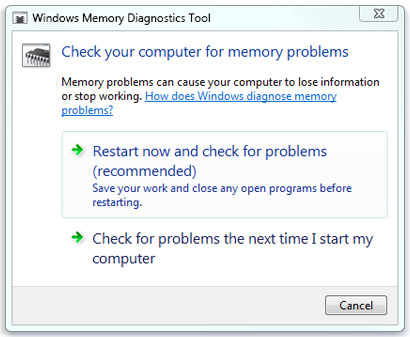
And so I tried the Windows Memory Diagnostic that came with Windows 7.

Windows Memory Dignostic

In less than a few minutes, I found out that my RAM really was busted.

Memtest86 was trumped by a Windows utility program. Weird.

Why not Mac?

One of the first things I asked myself when I left my job last year was “Should I get a Mac?” With the rise of the Apple App store and the lingering notion that the best developers work on MacBook Pros, I had to decide whether or not I’d shell out enough money to fulfill my needs for a year just to get such a machine for future work.

broken apple

I eventually decided not to buy one. I did, however, buy a 2nd gen iPod Touch 8GB for 8k to make me think about building iPhone apps. After some months of use, I concluded that I didn’t have the proper skill set to make apps on such a platform, firmly cementing the idea that I didn’t need a Mac for my personal projects. (I still use that device, though, primarily for late night fanfiction reading to lull me to sleep.)

Lately, I’ve had the opportunity to try out using Mac OSX and see what all the fuss is about regarding the platform. After using it for a while, my decision still stands: there’s no reason for me to buy a Mac.

Let’s look at things from a historical standpoint: If you were a serious developer 3-4 years ago, Mac was the way to go. Windows XP was a security nightmare while Windows Vista just sucked. Linux was as user-unfriendly as they get. Mac OS X Tiger beat them hands down.

Fast forward to the present: Windows 7 is both secure and “shiny” while still providing most of the familiar Windows interface. Malware is a lot less of a concern thanks to the unobtrusive and free Microsoft Security Essentials. On the Linux side, Ubuntu 10.04 Lucid Lynx has gone a long way in terms of giving a clean and user friendly interface to desktop Linux. Driver support has improved a lot; you don’t need to recompile kernels anymore. You’ll probably even have more driver problems with a Mac than with a Linux box.

In short, I don’t see a compelling reason to buy a Mac if you’re not a graphics designer/you’re not building Apple-specific software.

More details below the cut…
Continue reading “Why not Mac?”

How to avoid breaking builds

git The guy I’m mentoring right now in one of my freelancing gigs is fairly new to software development so I decided to give him a couple of guidelines (conveniently posted on the project’s wiki) on how to properly use git.

Hopefully this should spare me the horrible flashbacks to the days when everyone I was working with was consistently breaking builds everyday.

Best Practices

  • Commit often. The more you commit, the easier it is to do stuff like rolling back changes or pinpointing where a change was committed.
  • Put a meaningful comment every commit. You’ll be thankful you did that 3-6 months down the line when you’re trying to verify if a certain piece of code is a bug or a feature.
  • Push with care. Follow the procedure below to avoid breaking the build i.e. pushing a version of the code which doesn’t work.

Proper Version Control Procedure

Before you push your code to the repository, please follow the following procedure:

  • If you still haven’t done it yet, commit your changes to your local repository (git add and/or git commit -a -m).
  1. Pull the changes from the remote repository (git pull).
  2. In case of conflict, manually edit the conflicting files.
    • You may have to collaborate with the other dev for this.
    • After fixing the conflict, commit the merged changes and go back to step 1 (git pull).
  3. Run the DB migrations.
  4. Run the RSpec tests.
    • If the specs fail, either fix the code or fix the specs.
    • After fixing the failing specs, commit the fixes and go back to step 1.
  5. Run the Cucumber tests.
    • If the specs fail, either fix the code or fix the features.
    • After fixing the failing features, commit the fixes and go back to step 1.
  6. Do a simple developer test. Open the server, log in, and open a couple of pages.
    • If the system doesn’t work, find the problem and fix it.
    • After making the system run smoothly again, commit the fixes and go back to step 1.
  7. You can now push your changes to the remote repository using git push.

You might notice that we’re using RSpec and Cucumber in our project. I’ll talk more about them in a later post.

Nu Skin / Pharmanex and Multi-level Marketing

I haven’t been blogging lately because of the recent changes in my lifestyle (from bum to semi-freelance). From the looks of things, though, I might have to setup a regular blog update schedule, say once or twice a week, in order to improve my gravitas (?) as a freelance software engineer.

Anyway, to kick things off, let’s start with something that happened to me a couple of weeks back.

mlm

I received a call one Saturday morning from a guy who was offering me a job. Or something like that. It was around 9 in the morning that day and it was still an hour before I should wake up. All I recall is that the guy mentioned something about being in a “multinational company” and I was referred by a friend to a job with “high income” and “flexible hours”. Being groggy as I was, I immediately responded with what first came into mind: that I was not interested in the income and all I cared about is whether the project was interesting and whether the work hours are flexible enough.

I believe the guy hesitated for a moment after hearing such an unusual answer (people want money, not time), but regardless, the guy scheduled me for a 6:30 PM meeting the following Thursday at their office in Makati. The after-work hour meeting time was supposedly due to him being busy and that was the only time that he could meet with me.

Looking back, the whole thing was really fishy had I thought about it. But I didn’t; my past few freelancing gigs were of the same “referred by friend/acquaintance + meet with the guy to talk the job over” setup and they all went well. Besides, compared to those gigs, the friend that referred me this time around was a lot higher in the “people I trust” list.

Fast forward to the following Thursday. The first thing that came into my mind when I entered the guy’s office was:

Aw crap, I got suckered into an MLM seminar.

Continue reading “Nu Skin / Pharmanex and Multi-level Marketing”