
Other languages you should learn

body language

At first glance, this tweet in response to my previous post looks like a simple joke. But it’s actually true the more you think about it.

Understanding body language is important because software engineering is more about dealing with people than with software itself: almost all failed software projects are due to people problems (e.g. management and client problems) instead of technology problems.

Here are some cases where knowing body language can make a difference:

  • A client asks for too many features under an impossible deadline – by gauging the client’s behavior, you can determine if she’s basically bluffing (to which you negotiate a compromise by reducing the scope) or if she’s really that stupid/sadistic (to which you drop the client for better ones).
  • A developer puts in too many hours into overtime – depending on the dev’s behavior, a good manager would determine if that dev is simply temporarily getting brownie points for a promotion or upcoming long vacation. On the other hand, it may also mean that that dev is incompetent to the point that he needs more hours to fix his crappy code. At the worst case, it may also mean that that dev is already at stage 2 – 3 of going into burnout.

Another non-technical language you need to learn is Basic English.

Go ahead, laugh. But then recall the last time you’ve seen a “plz send me teh codez” post in a public forum or a job posting full of misspellings and grammatical errors (a big warning sign) and you’ll quickly realize how important it is to have a good grasp of the English language.

Lack of proper written English skills is a somewhat widespread problem in the current generation, with the prevalence of text-speak and the fact that a lot of young people don’t join international community websites/forums/mailing lists/chat rooms. This can be a problem when they enter the corporate world, where semi-formal English is the lingua franca: I’ve even heard of stories of project managers re-writing some of the team members mail before sending them to their foreign counterparts because of their poor English.

Note that your English doesn’t need to be at the level of essayists or other professional writers. In fact, simple, direct to the point (but at the same time, polite) messages is much more effective at communicating to clients or team members when compared to long-winded messages full of highfaluting words. Doubly so when dealing with clients whose primary language isn’t English.

To wrap things up, I just realized that I wrote about a similar topic a few years ago. You don’t need to click that link, as the tl;dr is just the same thing I’ve been saying all the time: developers need to learn more than just coding.

What programming language should I learn?

I got to talk for DevCon again last Saturday at STI Makati. Instead of preparing a new talk, I just rehashed an old talk to save time. The new talk is also over at Slideshare.

Anyway, the point of this post is to answer a question posed to me by a student in the Q&A portion of the talk:

Anong programming language ang dapat naming pag-aralan?
(What programming language should we learn?)

Here’s a question I wouldn’t want to hear answered by someone else (i.e. someone who’s also invited to talk to students). The question itself may seem simple, but unless you’ve seen how the industry works as a whole, you’ll probably give a wrong answer.

The traditional answer I don’t want to hear is to give a suggested list of languages based on market demand.

Simply put, this is bullshit. This is the same sort of bullshit that pressures our youth to take nursing courses even though they’re just in it for the money, money that they probably won’t get due to the eventual over-supply of nurses.

So for the student’s question, I gave two answers:

Programming language and platform choice doesn’t matter, because for the most part it’s a business decision.

Yes, I’m talking about steaks and strippers. In a large company, you may be initially hired to work on a single language, but eventually there will be a time where the company will make a business decision to shift technologies, whether due to market pressure or due to a new client. If you focus too much on a language, you will not be prepared for the change and you may end up getting fired or demoted.

In smaller companies or in a freelance setting, language still doesn’t matter, though for another reason: the client will not care about the language as long as you deliver the product.

This leads to the other answer:

Focus on the fundamentals, not on the language/platform.

A common mistake among fresh grads is that they’re confident they know language A or platform B because they were able to make their school projects or theses while at the same time not having their fundamentals down pat. Not only does this make them inflexible in terms of learning new languages, it also makes their work brittle and sloppy.

In other words, a student who has 4 years of school “experience” in Java is nothing compared to a developer who just had learned Java a month ago but has solid fundamentals in OOP.

You might say “Screw learning, I’m just in this for the money!”. But the fact is, there’s this thing called the Python Paradox: developers who are passionate enough to learn more than their peers often end up in higher-earning and less-stressful jobs.

Bottom line: There is no “best” language that you need to learn in order to earn a lot of money. However, if you have good fundamentals, learning the language and platform that the market needs will be much easier for you.

Quick Tips on Installing Mint on a Laptop

A recent system upgrade gave me a spare SSD for my laptop. I decided to install Linux Mint on it given my good experience on the Ubuntu based OS.

Here are some tips/thoughts related to this install:

Gnome 3 = Full Retard mode

It’s been a while since Ubuntu introduced Unity as the default display manager and it still feels sucky. The mere fact that I can’t change the number of workspaces easily on Mint 12 Gnome was enough to make me format the drive and try again with Mint 11 (which is still Gnome 2).

So I suggest you give Mint 12 a try first for a couple of hours and see if the “simplified” desktop appeals to you. If you’re not satisfied, just go with Mint 11 or Mint 12 KDE.

Lenovo wifi bug also happens on Mint

Remember that post about wifi not working in Ubuntu on my Lenovo laptop?

The same thing happened on my Mint installs. And the same solution still applies.

Changing lockscreen and login background on Mint 11

Remember that post about changing your lock screen on Ubuntu?

While that solution works, there’s also a simpler solution:

$ sudo ln -sf /path/to/another-background.jpg /usr/share/backgrounds/linuxmint/default_background.jpg

Note that, unlike in the old post, this only changes the background and not the whole lock screen.

As for the login background, some people might say that the default background trick will work but unfortunately it doesn’t. The real solution is an old trick from Ubuntu, namely:

$ sudo cp /usr/share/applications/gnome-appearance-properties.desktop /usr/share/gdm/autostart/LoginWindow

Logout. The appearance window will appear on the login screen and will allow you to change the background. After making your changes and logging in, prevent the window from opening again at login by doing:

$ sudo unlink /usr/share/gdm/autostart/LoginWindow/gnome-appearance-properties.desktop

Changing Gimp’s Default Save Folder

UPDATE: This fix doesn’t work with GIMP 2.8 and later.

Having to deal with image manipulation every once in a while, having Gimp not remember my last save folder is a bit annoying since my image folder isn’t the same as My Pictures. A quick Google search later, I found that the fix was pretty easy.

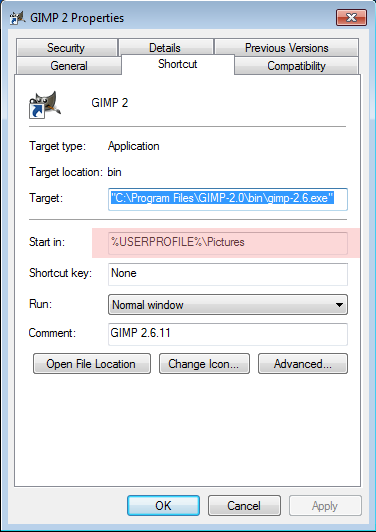
The trick here is that Gimp considers the current directory (i.e. where it is executed) as the default directory. Thus, to change the “default” directory setting in Windows, all you need to do is to open the launcher properties:

gimp settings

And change the “Start in” setting to the folder of your choice.

Convert FanFiction.net Stories into PDF

Had a coding itch last week related to web scraping and LaTeX PDF conversion. One thing led to another and the end result was my first ever Ruby Gem:

ffnpdf, a tool that converts FanFiction.net stories into PDF files.

(Great for putting your favorite Harry Potter slash fics on your mobile phone or tablet for portable use! LOL)

The code and documentation are found at the Github page. Theoretically, this gem can work anywhere Ruby, pandoc, and XeTeX can be installed (e.g. Windows, OS X, *nix) but I’ve only been able to make the whole thing work in Ubuntu/Mint.

Demo and how-tos are posted in this playlist:

I haven’t gotten around to make a license for this, but I assume that anyone into fanfiction knows that publishing and selling fanfics without consent from the rights owner is a big no-no. Thus, I don’t need remind them that this tool is just for personal use and not for commercial purposes.