UPDATE: This fix doesn’t work with GIMP 2.8 and later.
Having to deal with image manipulation every once in a while, having Gimp not remember my last save folder is a bit annoying since my image folder isn’t the same as My Pictures. A quick Google search later, I found that the fix was pretty easy.
The trick here is that Gimp considers the current directory (i.e. where it is executed) as the default directory. Thus, to change the “default” directory setting in Windows, all you need to do is to open the launcher properties:
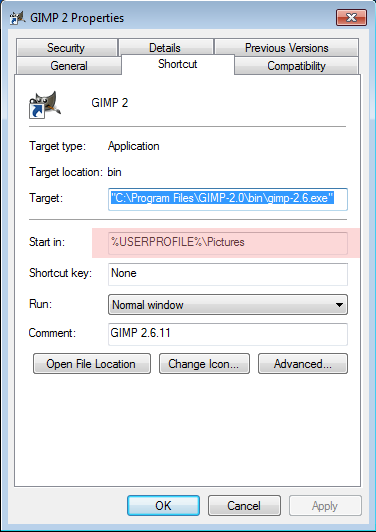
And change the “Start in” setting to the folder of your choice.
Yes, but how do you find the launcher/properties?
Start -> All Programs -> GIMP -> right-click GIMP 2 -> Properties
Like this.
Thanks!
does not work with gimp 2.8.16 on windows 10 64-bit
Seconding this.
Five years later, Google found this. Thanks for writing it up!