Quick Tips on Installing Mint on a Laptop

A recent system upgrade gave me a spare SSD for my laptop. I decided to install Linux Mint on it given my good experience on the Ubuntu based OS.

Here are some tips/thoughts related to this install:

Gnome 3 = Full Retard mode

It’s been a while since Ubuntu introduced Unity as the default display manager and it still feels sucky. The mere fact that I can’t change the number of workspaces easily on Mint 12 Gnome was enough to make me format the drive and try again with Mint 11 (which is still Gnome 2).

So I suggest you give Mint 12 a try first for a couple of hours and see if the “simplified” desktop appeals to you. If you’re not satisfied, just go with Mint 11 or Mint 12 KDE.

Lenovo wifi bug also happens on Mint

Remember that post about wifi not working in Ubuntu on my Lenovo laptop?

The same thing happened on my Mint installs. And the same solution still applies.

Changing lockscreen and login background on Mint 11

Remember that post about changing your lock screen on Ubuntu?

While that solution works, there’s also a simpler solution:

$ sudo ln -sf /path/to/another-background.jpg /usr/share/backgrounds/linuxmint/default_background.jpg

Note that, unlike in the old post, this only changes the background and not the whole lock screen.

As for the login background, some people might say that the default background trick will work but unfortunately it doesn’t. The real solution is an old trick from Ubuntu, namely:

$ sudo cp /usr/share/applications/gnome-appearance-properties.desktop /usr/share/gdm/autostart/LoginWindow

Logout. The appearance window will appear on the login screen and will allow you to change the background. After making your changes and logging in, prevent the window from opening again at login by doing:

$ sudo unlink /usr/share/gdm/autostart/LoginWindow/gnome-appearance-properties.desktop
Changing Gimp’s Default Save Folder

UPDATE: This fix doesn’t work with GIMP 2.8 and later.

Having to deal with image manipulation every once in a while, having Gimp not remember my last save folder is a bit annoying since my image folder isn’t the same as My Pictures. A quick Google search later, I found that the fix was pretty easy.

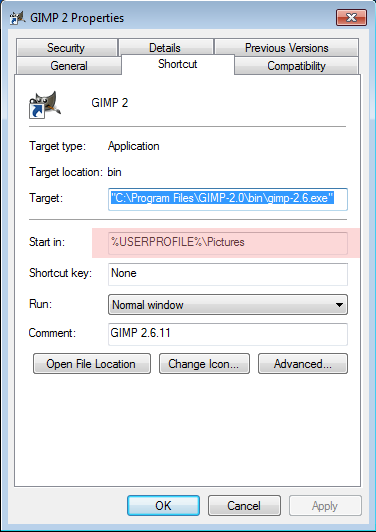
The trick here is that Gimp considers the current directory (i.e. where it is executed) as the default directory. Thus, to change the “default” directory setting in Windows, all you need to do is to open the launcher properties:

gimp settings

And change the “Start in” setting to the folder of your choice.

Convert FanFiction.net Stories into PDF

Had a coding itch last week related to web scraping and LaTeX PDF conversion. One thing led to another and the end result was my first ever Ruby Gem:

ffnpdf, a tool that converts FanFiction.net stories into PDF files.

(Great for putting your favorite Harry Potter slash fics on your mobile phone or tablet for portable use! LOL)

The code and documentation are found at the Github page. Theoretically, this gem can work anywhere Ruby, pandoc, and XeTeX can be installed (e.g. Windows, OS X, *nix) but I’ve only been able to make the whole thing work in Ubuntu/Mint.

Demo and how-tos are posted in this playlist:

I haven’t gotten around to make a license for this, but I assume that anyone into fanfiction knows that publishing and selling fanfics without consent from the rights owner is a big no-no. Thus, I don’t need remind them that this tool is just for personal use and not for commercial purposes.

Project Я: A Ruby/HTML5 Visual Novel

first scene

As promised, here’s the game I made for the Global Game Jam.

Seeing that I couldn’t think of a quick web-based game matching the theme “Ouroboros”, I just went ahead with a joke I made sometime after the Ruby Rumble:

Sa susunod na Rumble, gagawa ako ng hentai game sa Ruby!
(For the next Rumble, I’ll make a hentai game in Ruby!)

So yeah, that’s how I ended up with a Visual Novel. Unfortunately for the people expecting sexually explicit scenes (which was about a third of the people who saw the game), the “game” I made was more ATLUS/Capcom than Key/Type-Moon.

Anyway, it’s more of a tech demo than a game, with me trying to implement a Cloud-based multi-platform visual novel with psychological themes and non-standard tactical RPG gameplay. Or in non-buzzword speak, an HTML5 adventure game playable over the internet.

Play it here.

Please use fake email addresses so you could view the changes when you change the answers to the initial questions.

Some boring technical details:

I didn’t release the code because of how ridiculously horrible it is. I mean, using GET to update state, WTF?!?

RailsFTW, now twice as fast!

Rails FTW

My Game Jam post is waaay overdue but some stuff happened this week (impromptu upgrade, server migration) so I’ll only get around to post about it probably later today.

Anyway, this post is just about the new version up over at RailsFTW. This experimental build is based on TCS’s patched Ruby build which boasted a ~200% increase in performance.

See it for yourself: