Troubleshooting: Blender only renders one frame

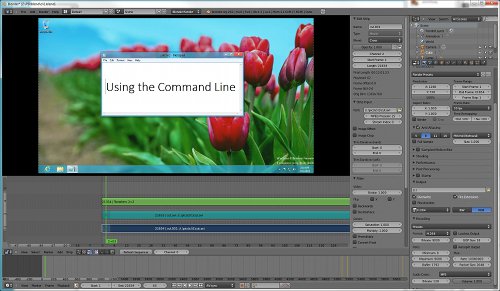
Ran across this problem earlier. For some reason, Blender only renders one frame when rendering today’s Intro to CLI video.

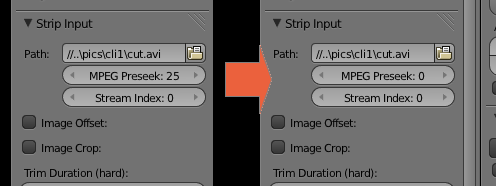
The quick fix is to change the MPEG Preseek to 0.

set preseek to 0

I’m not sure why it happened, but my guess is that if your entire video is just made up of one source video (see below) and that source uses a weird codec, Blender messes up in pulling the correct frame for that time.

Blender as an NLE

(Yes, I’m using Blender as PD‘s main non-linear editor.)

Baguhan Biyernes: Bakit ang daming terminology na binabato sa iyo pag nag-aaral ka ng programming?

(Susubukan kong gumawa ng isang “weekly column” tungkol sa pag-aaral ng programming at software development. Bukod sa extra advertising para sa Pangkaraniwang Developer, mahahasa ko rin ang aking pagsusulat sa Tagalog.)

May isang magandang thread ngayong linggo sa r/learnprogramming kung saan nagrereklamo ang isang nag-aaral ng programming hinggil sa rami ng terminology na nakikita niya sa isang tutorial. To paraphrase/translate:

Isa akong baguhan na sinusubukang matuto ng jQuery, pero noong ini-introduce ako sa kanya ng kakilala ko, maraming lumabas na mga terminology na hindi ko alam sa 5 minutong usapan na iyon:

  • bind
  • delegation
  • node
  • handler
  • listener
  • event
  • bubbling

Ganito ba talaga kahirap matuto ng programming?!?

Pag binasa ninyo yung thread, madaling mahalata yung problema nung nagtatanong: hindi pang-baguhan ang jQuery, pero gusto parin niya itong matutunan kahit hindi pa siya bihasa sa JavaScript.

Gaya nga ng sabi ng ibang commenter, parang pumasok siya sa isang Calculus class kahit hindi pa siya dumaan sa Algebra at Trigonometry, at ngayon umaangal siya na hindi pinapaliwanag ng propesor ang sine at logarithm. Kaya nga may mga terminology tayo — hindi lang para hindi tayo magsayang ng oras sa pagpapaliwanag kung ano iyon, sa paggamit ng terminology, ipinapalagay na ng kung sinumang gumamit noon na maiintindihan na ng nakikinig/nagbabasa kung ano ang gusto niyang ipahiwatig kahit hindi siya simple.

Halimbawa, maraming pwedeng ibig-sabihin ang “node” kahit sa computer science, pero pag lumabas siya sa usapan tungkol sa jQuery, dapat naiintidihan ng lahat ng nasa usapan kung aling “node” iyon.

Sang-ayon ako sa huling payo ng mga commenter: dapat unti-untiin niya ang pag-aaral ng programming. Sa web development, medyo marami kang dapat matutunan bago ka mag-jQuery: HTML, CSS, at intermediate JavaScript. Hindi magandang sumabak sa isang tool o framework na ginawa para sa mga experienced developers kung ikaw mismo ay hindi experienced developer.

Pero kung tutuusin may punto rin naman siya. Hindi mo maiiwasan na dumiretso sa mga intermediate topics ang mga baguhan kaya mabuti kung mayroon kang mga paraan para mas mapadali yung buhay nila.

Kaya nga sa simula palang ginawa ko yung PD na may mga “Previous Lesson” links para malaman ng mga student kung ano yung mga kailangan nilang malaman bago nila pag-aralan yung current lesson. Balang araw, magkakaroon rin ng glossary of terms bawat lesson para hindi mahirapan ang mga student sa paghanap ng kanilang kahulugan. (Pero saka na iyon, tinatamad pa ako ;P)

Just Shut Up And Do It!

As with all prudent website owners, I regularly check my analytics for my sites to see trends and the occasional weird referrer (e.g. just tonight my Wooga post was linked by some Korean guy on Facebook).

In addition to Google Analytics, I also use Piwik so that I could see the IP addresses of visitors without having to go and open the nginx logs. Unfortunately, Piwik’s somewhat unreliable with the IP lookup:

Piwik

When that happens, I turn to any one of the many Whois and IP lookup sites and see where these visitors come from.

One thing I noticed about this approach is that I sometimes search IP addresses which are similar to past searches. If I had a way to list down my previous searches, I might be able to reduce the amount of these repeat lookups.

Now the obvious first choice would be to build a Rails application with Geokit and call it a day. But that wouldn’t be fun, wouldn’t it?

So instead of doing that, I decided to take this opportunity to finally learn Backbone.js.

A couple of hours later…
Trac(k)er

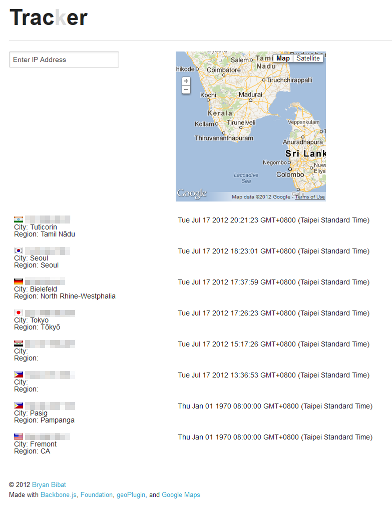
Introducing Trac(k)er, a quick and dirty IP tracer/tracker built with Backbone.js, Backbone.localStorage, Zurb Foundation, Flag Sprites, geoPlugin, and Google Maps.

You might be wondering what’s the connection between introducing a simple web application and the title above. The answer’s related to a previous post where I ranted about people who wait until they get a certain tool before trying to learn something.

This time around, I’ll be taking aim at a superset to that set of people: people who talk about wanting to do something but never get around to do it.

When I want to learn a new technology, I do the following:

  1. I read up on the technology, maybe watch a few presentations about it, all just to see what it’s about.
  2. I find a current problem that I have that can be solved by that technology.
  3. I try solving that problem with that technology.

My 3-4 hour romp through building a mashup with Backbone and GeoIP is a perfect example of this approach. I’m nowhere near the level of even a competent Backbone developer, but at least I have a passing knowledge of the basics behind the technology.

Pretty much everything I learned on my own was like this. I learned how to setup and manage a LAMP stack to let me try out various PHP apps like WordPress and MediaWiki. I learned Rails to help out in building my friends’ inventory management system web app. I learned nginx because Apache was eating too much memory when I had a memory-intensive web app. The list goes on…

On the other hand, when they want to learn a technology, they go:

  1. They hear about the technology and get hyped.
  2. They talk about how they’re going to learn that technology.
  3. They realize it’s a lot harder than they expected and they start making excuses.
  4. They make a big excuse so that they can abandon the technology and move on to the next shiny thing.
  5. Lather, rinse, repeat.

So my suggestion to people who want to learn something new but don’t want to become like the latter:

Just shut up and do it!

And my suggestion to those who have “legitimate” excuses for not being able to push through with what they planned to do:

Just shut up the next time!
You are not as good as you think you are

I know I’ve mentioned this before, but recent events have convinced me to mention the Dunning–Kruger effect again.

Kruger and Dunning proposed that, for a given skill, incompetent people will:

  1. tend to overestimate their own level of skill;
  2. fail to recognize genuine skill in others;
  3. fail to recognize the extremity of their inadequacy;
  4. recognize and acknowledge their own previous lack of skill, if they can be trained to substantially improve.

While the Dunning–Kruger effect is a common cognitive bias, the local culture of “Sirs” and “Masters” seems to have amplified it. In the past few weeks, I’ve been in online discussions related to business and application security where the people I’m talking to aren’t even aware of their lack of (basic) knowledge on the topic. The real problem here wasn’t that they could be debunked easily by any serious book on their respective topics; the problem here was that only a few (or no one in the latter case) stepped in to point out the flaws in their arguments – flaws that only newbies should make.

The “Sir/Master” mentality’s influence is twofold:

  • First, people who are called “masters” are content with their skill set and fail to look for gaps in them (classic Dunning–Kruger). Hence, they are not aware if someone is wrong or not.
  • Second, people are not willing to call out the “masters” when the former sees the latter say something wrong. It’s your post count automatically makes you a senior person who shouldn’t be questioned.

In other words, “Sir/Master” indirectly leads to “pwede na” (it’s good enough).

Note that this “pwede na” attitude isn’t limited to local communities. One recent article proposes that PHP’s problem doesn’t solely lie on the language itself, but that its ease of use produced a lot of incompetent developers who provide wrong advice to newbies which in turn become even worse developers. A few days later, a group of people made PHP: The Right Way as a means to promote good coding practices for the language.

Unfortunately, I feel that it will take a while for this movement catches on in the PHP community. The Dunning–Kruger effect has a pretty strong hold on PHP developer groups, and even locally it took 2 days before someone posted it to the forum.

Building Wooga’s Pocket Island in Windows

Last week, social/mobile game developer Wooga released the code of one of their HTML5 games as open source.

Unfortunately for Windows users, the whole application was built in a Mac. Because of this, a lot of Unix-y stuff they put in won’t work even if you install minGW e.g. #! executables and egrep/printf.

Normally, I’d just suggest a Windows user to just install Linux on a virtual machine but that would be too easy.

Taking these problems instead as a challenge, I tried to get around them by playing around with the code. After tweaking tasks/build.rake for a bit, somehow things just worked. Yay!

So for those interested, here’s how to build the game on Windows 7 (haven’t tried it on XP but it should work):

  • Install Ruby + DevKit + msysgit. Or just get RailsInstaller to install all of that for you.
  • Install Node.js
  • Add msysgit’s minGW and Node.js to your PATH. e.g ;C:\RailsInstaller\Git\bin;C:\Program Files\nodejs\.
  • Clone my fork and use the win-kludge branch:

    git clone git://github.com/bryanbibat/Pocket-Island.git
    cd Pocket-Island
    git checkout win-kludge
    
    
  • Download and extract the images to the images folder.
  • Follow the installation normally.

    npm install -g less jslint
    gem install spritopia
    rake
    
    
  • (optional) Start the simple static server then open http://localhost:4567/ipad.html.

    gem install sinatra
    ruby -rubygems server.rb
    
    
  • (optional) Install Java and run the rake all.

    rake all
    cd build
    copy ..\server.rb .
    ruby -rubygems server.rb