Additional Steps for RailsInstaller in Windows 8

[UPDATE: You no longer need to do most of the steps below in recent versions of NodeJS. RailsInstaller/RubyInstaller should work just by installing NodeJS.]

If you’ve tried using RailsInstaller or RailsFTW in Windows 8, you might think it works out of the box — that is, until you open a page that uses the asset pipeline and get a cryptic message related to your CSS/JS.

The reason for this is that the built-in JScript runtime is incompatible with Rails. You need to install Node.js and make it the primary runtime for Rails to work.

The easiest way to do this is:

  1. Install Node.js
  2. Run Node.js » “Node.js command prompt”
  3. Get the path of node.exe via “path” command. You’ll get something like:
    C:\Users\bry>path
    PATH=C:\Users\bry\AppData\Roaming\npm;C:\Program Files\nodejs\;C:\Program Files...

    Get the “C:\Users\bry\AppData\Roaming\npm;C:\Program Files\nodejs\;” part.

    Tip: right click command prompt window » Poperties » tick QuickEdit Mode so you can select and right click to copy to clipboard.

  4. Edit the setup_environment.bat for RailsInstaller (e.g. C:\RailsInstaller\Ruby2.0.0\setup_environment.bat, Notepad will do), find the following line
    SET PATH=%RUBY_DIR%\bin;%RUBY_DIR%\lib\ruby\gems\1.9.1\bin;%ROOT_DIR%\DevKit\bin;%PATH%

    for RailsFTW this will be setrbvars.bat (e.g. C:\RailsFTW200402\bin\setrbvars.bat) and the line will be:

    SET PATH=%RUBY_BIN%;%PATH%

    and add the Node.js path after the SET PATH= e.g for RailsInstaller:

    SET PATH=C:\Users\bry\AppData\Roaming\npm;C:\Program Files\nodejs\;%RUBY_DIR%\bin;%RUBY_DIR%\lib\ruby\gems\1.9.1\bin;%ROOT_DIR%\DevKit\bin;%PATH%

    for RailsFTW:

    SET PATH=C:\Users\bry\AppData\Roaming\npm;C:\Program Files\nodejs\;%RUBY_BIN%;%PATH%
  5. At this point, RailsInstaller » “Command Prompt with Ruby and Rails” and RailsFTW » “Start Command Prompt with Ruby” will now have Node.js as the runtime.

Haswell, Laptops, and MBPs

Intel officially released Haswell, it’s latest processor series, at Computex 2013 this week. While there’s not much to say about in terms of performance so desktop users using Sandy/Ivy Bridge processors don’t have a reason to upgrade, the energy efficiency boost in Haswell is poised to shake up the laptop / tablet / all-in-one market.

And it’s quite possible that future MacBook Pros will be negatively affected by this change.

How?

It’s all a matter of battery life.

When going out to buy a laptop, all of us have our own criteria that we rank in terms of importance. Here are some of those criteria:

  • Price
  • Performance
  • OS
  • Build quality
  • Mobility (battery life + weight)
  • Looks
  • Upgradability

For a die-hard Mac user, all of these are no-brainers — the only decision they have to make is whether to get an Air or a Pro. But for the rest of us, these are all valid criteria to think about.

In my case, I don’t really care about the following:

  • OS – OS X, Windows, and Linux are okay. I’ll be dual-booting or using virtual machines for Linux development work anyway.
  • Performance – multimedia laptops (including MBP) share the same narrow performance range, same goes with ultrabooks and Air. This is because all of them use the same processor families.
  • Build quality – it’s not that I don’t care about build quality; it’s just that it’s easy to take this out of the question when you only consider Apple, Asus, and Lenovo.
  • Looks – nowadays, every freaking non-Thinkpad laptop looks like an MBP and every freaking ultrabook looks like an Air

So I’m left with 3 criteria: Price, Mobility, and Upgradability.

When you have to choose between ultrabooks vs Air, it’s more of a matter of what specific specs you want: For the most part, a “stock” Air is cheaper than many ultrabooks, but weaker; while a fully upgraded Air will be more powerful but will be much more expensive than other ultrabooks.

On the other hand, when it comes to multimedia laptops, the decision goes this way:

Apple – really expensive, long battery life, not easily upgradable

Asus, Lenovo – ok price, so-so battery life, upgradable

And that’s with Ivy Bridge.

If laptop manufacturers take full advantage of Haswell’s capabilities (and that’s a big if), it’s going to look like this:

Apple – really expensive, really long battery life, not easily upgradable

Asus, Lenovo – ok price, good battery life, upgradable

This is where I think multimedia PC laptops can close the gap between them and MBPs. Previously, having an 6-hour battery life makes Macs an easy choice for many people on the go. But when every laptop has an 4-5-hour battery life, will your average on-the-go PC user still consider getting an MBP for twice the price just to get twice the battery life?

In other words, the jump between 3 hours of battery life to 6 hours is a big deal as it’s a sweet-spot for working (a person can only be fully productive for about 6 hours a day) but we’ll have to wait and see whether the market thinks going from 6 hours to 12 hours is worth paying the premium.

Fixing broken earphone plugs

Rico’s tweet a couple of days ago reminded me of my drawer full of perfectly fine earphones — the only reason I can’t use them is that they have worn connections on their plug causing only one side to work. (Actually, both sides can work but you have to hold the wire near the plug at exactly the right position. Move a bit and one side loses sound.)

This got me wondering: is it easy to replace a busted earphone plug?

A quick Google search told me the answer was “yes“. This Instructables article on replacing the jack on a pair of headphones only required a cheap replacement plug and some basic tools.

Seeing this as a good opportunity to procrastinate on my current projects, I bought a 3.5 jack at my friendly neighborhood hardware store when I went out to lunch today.

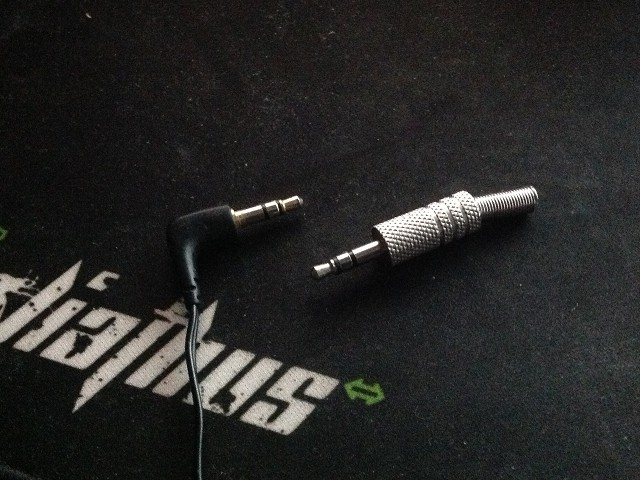
busted jack and new metal jack

Here it is beside the busted earphone jack.

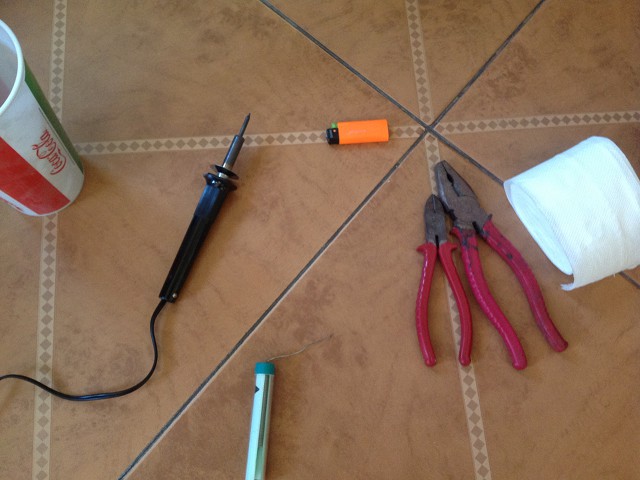
soldering tools

And here are the tools I used:

  • wire cutter – for cutting and stripping the wire
  • pliers – to hold the jack in place while soldering
  • lighter – to burn the wires’ insulators prior to soldering
  • soldering iron and solder – for soldering, obv
  • tissue and water – I can’t find my soldering stand with sponge so I had to improvise the latter; it’s just a quick solder so no need for a stand

As much as the smell of molten solder can be kinda nostalgic, I moved my workspace from my enclosed air-conditioned room to the open living room for safety.

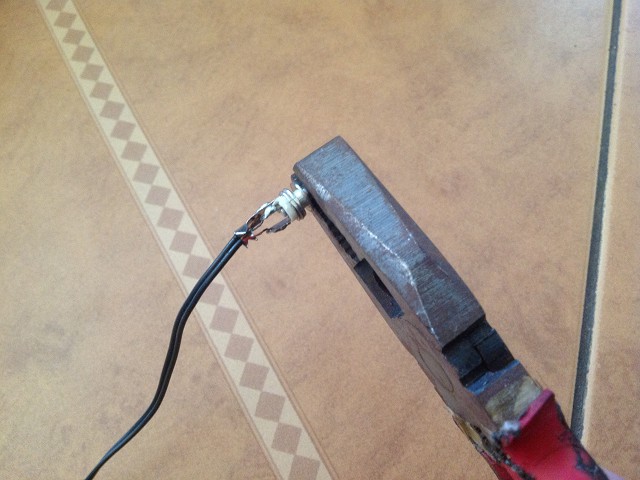
wires soldered to jack

After an hour or two of trial and error, mostly in threading the wires into the pins and testing stability of the connection, here’s the wires soldered to the pins. The actual soldering took only around 5 minutes and I was surprised that it didn’t suck like my soldering in high school.

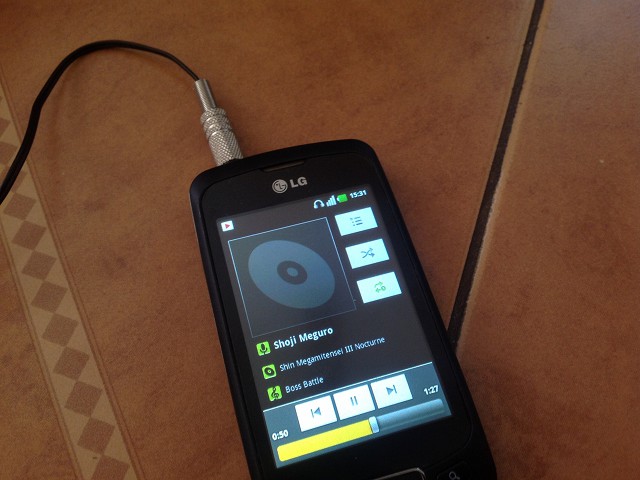
finished product

And here’s the fully assembled jack. A quick test confirmed that both sides are working properly even when playing around with the wire.

Total cost: P25 for the plug, ~2 hours for research, prep, and assembly.

I am not a “Blogger”

I’ve been recently getting emails from various sources grouping me with the local blogging community. I usually just ignore them, giving a passing glance at those that may contain usable information. Last night, however, I received a message that forced me to write this post.

For the sake of those who are not familiar with me, let me introduce myself first. I am someone who has taken (and is still taking on) many roles: freelance web developer, software engineer, teacher, volunteer, public speaker, and so on.

“Blogger” is not one of them.

But if you’re not a blogger, what is this site (blog.bryanbibat.net) then?

True, this is indeed a web log in the technical sense. However, it’s not a blog in the “blogger”‘s sense. A quick look and you’ll see the difference:

No Ads. I’m a Rails developer. Any ad money I could get will be far lower than what I’d get even from part-time work.

Super Fast. Jekyll = street cred. Since I don’t feel like migrating yet, I’ll have to make do with optimizing WordPress using nginx (dev) + PHP-FPM + PHP-APC on an 8-processor server and adding CDN and caching.

Minimalist. Free responsive theme. Twitter microblog. Links to my sites and affiliates. A tongue-in-cheek appearance list. Obligatory archive links and stats. Copyright information. Nothing else.

Deeper content. I’m writing 10 pages of algorithm analysis while other “blogs” are dropping smartphones off buildings.

My reason for going away from the norm is simple:

No one wants their site to be labeled as a “blog”

If this was 2004, it would be fine to have a slow, cluttered ad plastered site with stupid content.

But this is 2013. No one wants their site to be lumped together with the stereotype. Just look at the top 2 “blogs” in my current spheres of interest:

WebGeek.ph may appear like a blog at first glance, but in reality it’s a vibrant community of developers and designers. Not only do they get large turnouts in their events, they even get sponsorships from all over – not bad considering none of the key people within the community are working on it full time.

theBobbery may also appear like a blog, but scrolling down and visiting a few pages will immediately tell you that it’s the type of news and information site that other blogs should have been in the first place.

Clean, ad-free sites with quality content; I am fairly certain that John Arce and Franky Branckaute would give me a look of disapproval if I would call their sites “blogs”.

Now I’ve already made it clear why I don’t want people calling this brain dump/soapbox a “blog”, let’s go back to the word “blogger”.

You can do better than “Blogger”

“Blogger” is a stupid label. I know it’s a catch-all term, but this doesn’t excuse it’s stupidity.

Again, it’s 2013. Web-based publications have gained enough mainstream acceptance that they’ve already killed off some established print publications; don’t you think it’s time for people to label themselves more specifically? For example, I can call myself a “software engineering writer”. Other bloggers can go with “gadget reviewer”, “independent journalist”, or “foodie” (groan).

But more importantly, the term “blogger” is forever tainted by those who chose to label themselves as such in the early days of the Internet: unprofessional freeloading hacks who follow no journalism ethics and standards.

Which brings us back to the message I got last night, a message that tried to drag me into an Internet drama that does not concern me. Not only that, but all signs point it to being a case of identity theft; a sloppy, easily verified one at that.

So here I am, a guy who finds multi-million dollar blunders and industry-wide discrimination debates merely amusing, and someone thinks I’d care about some idiotic personal feud just because I have a blog with over a hundred posts?

Screw that!