

Second Rails post of the week. I don’t really mind since it’s just going to be a small post and would let me reach my 2 post per week quota this early.

Remember that post about Ruby on Windows? Well, one thing led to another and PhRUG thought it was a good idea to fork the RubyInstaller to create an installer which includes everything one needs to create a Rails 3 app (Ruby + Rails + SQLite). Being the sneaky guy I am, I decided to create a proof of concept installer by hacking away at the RubyInstaller source code.
Here’s that installer: Rails For (the) Windows, version 0 (edit: latest version is v0.4. grab it here)
With this installer, you can create Rails apps in just a few steps:
- Download and run the RailsFTW installer.
- Start Command Prompt with Ruby. If you ticked “Add Ruby executables to your PATH” in the install process, you can simply open a normal command prompt
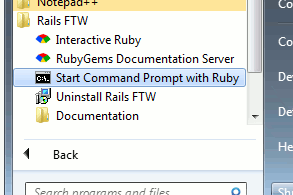
From there, you can now create the 5-command rails app:
C:\Users\me> rails new blog
C:\Users\me> cd blog
C:\Users\me\blog> rails generate scaffold entry subject:string content:text
C:\Users\me\blog> rake db:migrate
C:\Users\me\blog> rails server
You may have to unblock ruby in the firewall prompt to make the server work.
Open http://localhost:3000/entries to see your new app.
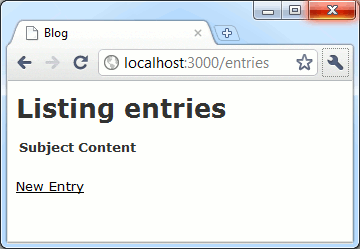
We still have a long way to go before we could supercede InstantRails, but this little hack job looks promising. Luis Lavena, a main contributor to RubyInstaller, even approves of this venture. Maybe later we could move on to other Ruby frameworks… Merb FTW or Sinatra FTW anyone?

[…] this new version of Rails FTW, the answer to that question is […]
“Because we know that you’d rather spend time working on Rails rather than installing it. ”
From the beginning…still endure to install the “normal way”…finally give up and try this Rails FTW
Gossh…love the tagline!!!! thx a lot