Graphics Card Hierarchy Chart

Aside from PSUs another source of confusion for normal consumers buying PCs is the graphics card. For normal desktop use, any cheap graphics card will do as long as the card fits in the motherboard (AGP or PCIe) and monitor (VGA or DVI-I or both). For gaming however, the graphics card spells the difference between smooth and choppy gameplay.

Aside from PSUs another source of confusion for normal consumers buying PCs is the graphics card. For normal desktop use, any cheap graphics card will do as long as the card fits in the motherboard (AGP or PCIe) and monitor (VGA or DVI-I or both). For gaming however, the graphics card spells the difference between smooth and choppy gameplay.

When I try to explain in the past how to buy graphics cards, I’d mention the naming scheme used by both nVidia and ATI/AMD: the final 3 digits determine the intended market of the card (e.g. an nVida 8200 will be for entry level machines while an 8800 will be for gaming) while the rest of the numbers determine the generation of the card (e.g. an ATI HD4850 is 5 generations higher than an ATI 9800). While simple, I find that this is still confusing to many.

So for this post, I’ll just point you to Tom’s Hardware‘s Graphics Card Hierarchy Chart.

Continue reading “Graphics Card Hierarchy Chart”

The Knowledge Worker

Probably the most important contribution of Peter Drucker to modern management is his study on knowledge workers.

For most of us, the term “knowledge worker” may just be a fancy term for “white collar professional”, people with specialized training tasked to use information for different goals. For example, an engineer uses a client’s requirements to design structures, and a doctor interprets the symptoms of a patient to find the best way to treat the disease. But as Drucker would point out in his writings, most companies do not understand that knowledge workers are fundamentally different from their blue collar counterparts.

Here is a small (and by no means exhaustive) list of things about knowledge workers:
Continue reading “The Knowledge Worker”

More Necessary CS Skills

Body feels like heck today as a result of breaking demolishing a personal fitness record yesterday. The heat isn’t helping.

I’m not in the mood to conduct research so here’s a follow up to a previous cheat post.

Learning basic web development and photo editing is not enough to be competitive in the IT industry. Here are other necessary skills for a fresh grad to learn.

Google-fu

Practice your Google-fu.

I don’t really need to explain why you should learn how to efficiently use Google to find the information you need. Between finding answers to software problems up to stealing code, Google is an indispensable tool for a software developer.

Unfortunately, not a lot of people know how to choose the proper keywords or determine which keywords should be enclosed with quotation marks (I’ve even lost count of how many times I’ve seen this happen in my previous company). With a bit of practice, though, you could overcome this problem and eventually learn to stalk people find solutions in Google in no time.

Get enough Linux/SysAd/programming experience to install a LAMP server from scratch.

This might sound impractical to people working with .NET, Java, or any development tool whose primary audience does not use the LAMP platform, but the sheer amount of useful free/open source software built for LAMP makes it hard to ignore.

When you build a LAMP server, from installation of OS up to setting up some basic apps like WordPress and MediaWiki, you will learn a lot of basic skills in the process. Installing the OS is a no-brainer, but the other stuff aren’t so trivial especially to people used to working in Windows: using a shell (and optionally installing SSH to allow remote terminal access), using vi, emacs, nano, or any console based text editor; learning the Linux user security model e.g. setting file permissions, etc. The learning doesn’t stop once you get to the AMP part, as configuring Apache, MySQL, PHP, Perl, and Python for basic usage still requires a bit of research (and trial and error).

In line with learning LAMP, you might also want to learn how to create virtual machines via VirtualBox or VMWare Server to remove the need for dual booting or getting a dedicated machine. LAMP servers are lightweight compared to modern OSs so the host machine’s performance will probably not be affected by hosting a virtualized server.

Understand how the Internet works.

This one’s essential for web developers. No, I’m not saying you need to do crazy impractical stuff like memorize the OSI Model. What I’m saying is that as a person creating dynamic websites, you should at least know the basics of networking, especially HTTP.

People who know these stuff might find it funny that there are web developers who aren’t familiar with how browsers and servers interact via HTTP, but in reality, a lot of people don’t know these basics. I myself didn’t know the difference between POST and GET requests until my second year in the business.

Learning how to use common network related tools like packet sniffers and port scanners is also useful in web development. Having Wireshark in my machine actually gave me “unfair” advantage in my projects, allowing me to isolate and fix difficult bugs that other devs couldn’t handle.

Simple Six-Week Training Programs

100 push ups

Here are three simple six-week training programs designed for people who don’t have time to go to the gym and/or don’t want to buy exercise equipment:

I found the first one in a Lifehacker article last year. Since then, the site owner decided to expand (copy-paste :P ) the program to work on the abs and the thighs.

I’d like to give couple of comments about the programs. First off, always keep in mind that working out a body part will remove fat from it i.e. targeted fat loss doesn’t work. You’ll need to control your calorie intake for that. At most, these exercises will tighten/tone their respective body parts preventing the loose skin and fat from sagging.

The other thing about these programs is that the sit up and squat challenges are too easy compared to the push up challenge. This is because the muscle groups used in those exercises are large and as such, respond quickly to exercise. Heck, in my summer weight training class back in college, we were doing 4 sets of 500 crunches at the end of the 5th week.

On the other hand, push ups use both large muscle groups (chest, abs, and to a smaller degree, back) and small muscle groups (shoulders and triceps). Unless your push up stance is wide (which puts more effort on the chest) your progress will be hampered by the relatively slower responding shoulder muscles and triceps. Expect to repeat some weeks for 3 times or more.

Track PC usage with ManicTime

Manually logging stuff for future data analysis is annoying. I already mentioned in a previous post that calorie counting and logging expenses are tedious tasks, but one must do both if they are serious about reaching their fitness and financial goals.

Another case where manually logging data can be useful (but at the same time tedious) is tracking how much time you’re spending each day for various tasks. You can analyze this data at the end of the week and figure out where you can improve your efficiency. For example, you might realize that you’re spending too much time checking your mail or you might realize that you’re not putting enough effort on higher priority tasks.

Based on experience, however, manually logging effort data is a lot more tedious and error prone than calorie counting and logging expenses. Computerized effort logging, whether via stand alone app or web interface, doesn’t improve the experience much.

Fortunately, there are applications available that can help automate some of that data tracking. Applications like Slife, RescueTime, and Wakoopa automatically track your computer usage by taking advantage of the fact that it’s actually quite easy to determine the title of the active window in your workspace.

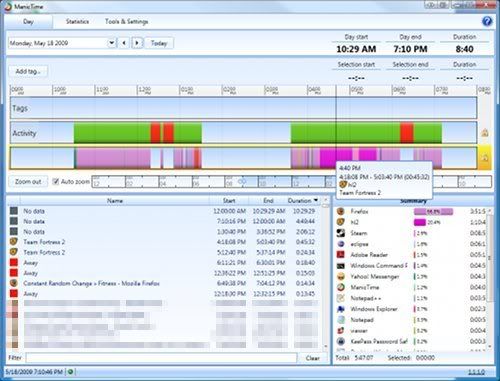
ManicTime - pr0n sites pixelated XD

I personally use ManicTime for tracking my computer usage. The main advantage it has over other similar applications is that the data is stored locally, meaning you don’t need an internet connection for it to work and you don’t have to worry about the odd chance that a hacker can see what pr0n series you’re watching.

There are downsides to ManicTime though. First off, it’s not a small app as it runs on top of .NET Framework 3.5. It may eat 30-60MB of memory, but it doesn’t slow down your machine until you view the daily or statistical data. Another downside is that it’s only for Windows. Mac users will have to make do with Slife for automated tracking.