Use Global .gitignore

Just a quick tip for those using Git and constantly keep on adding personalized settings to their project .gitignore: not everyone uses vim and have to worry about .swp files and not everyone uses a Mac and has Mac turds everywhere.

What every Git user should know is that there’s a way to set a global .gitignore file. According to the man page:

Each line in a gitignore file specifies a pattern. When deciding whether to ignore a path, git normally checks gitignore patterns from multiple sources, with the following order of precedence, from highest to lowest (within one level of precedence, the last matching pattern decides the outcome):

  • Patterns read from the command line for those commands that support them.

  • Patterns read from a .gitignore file in the same directory as the path, or in any parent directory, with patterns in the higher level files (up to the toplevel of the work tree) being overridden by those in lower level files down to the directory containing the file. These patterns match relative to the location of the .gitignore file. A project normally includes such .gitignore files in its repository, containing patterns for files generated as part of the project build.

  • Patterns read from $GIT_DIR/info/exclude.

  • Patterns read from the file specified by the configuration variable core.excludesfile.

GitHub’s help pages show how simple it is to set the global core.excludesfile setting:

Global .gitignore

A global .gitignore file can also be used by adding one to your global git config. For example, you might create the file ~/.gitignore_global and add some rules to it. To add this to your config, run git config --global core.excludesfile ~/.gitignore_global

To get you started, there’s an entire folder in GitHub’s .gitignore repository dedicated to global .gitignore entries where you can copy from.

Speed up your websites with Page Caching

A few weeks ago, I took part in the performance tuning of WebGeek.ph. If you’ve been a constant visitor to that site last month (e.g. you’ve been checking for updates to the upcoming DevCup), you would’ve noticed the constant downtime due to server errors.

And if you’ve just visited that link above just now, you’ll notice that the site quickly loads. It may even load faster than most local websites.

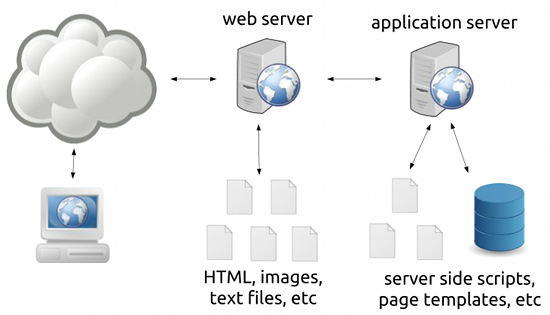
So what did we do to solve the downtime problem? The answer can be seen in the following diagram:

web server

It shows an oversimplified view of how web servers work:

  1. Requests first go to a web server that serves files (images, text files, non-changing HTML files).
    This is for unchanging or static content.
  2. Requests can also be forwarded to an “application server” (which can be anything from a CGI, FastCGI, an interpreter like mod_php, or a servlet container) which processes server-side scripts that may or may not access databses.
    This is for changing (e.g. Facebook.com would look different for different people) or dynamic content.

Most blogging software like WordPress work using the latter; the application server will process and generate a new response every time a request comes in.

Now this isn’t a problem when you’ve got only a few readers on your site – your server can handle this with a lot of processing power to spare. The problem lies when you’re working with a site that can have hundreds of requests a second, say you’re a heavily linked site like WebGeek.ph. As seen in the downtime of the said site in the past months, heavy load on your application server can bring your server down.

You can solve this problem by throwing a more powerful server at the problem, but as we all know, servers aren’t cheap.

The first (but not the only) answer to this problem is to realize that blogs and CMSs are not web applications but are web content sites, that is, most of the pages are unchanging. If we could find a way to turn our dynamic pages into static pages and push the processing from the application server to the web server, we can dramatically reduce the load to our server.

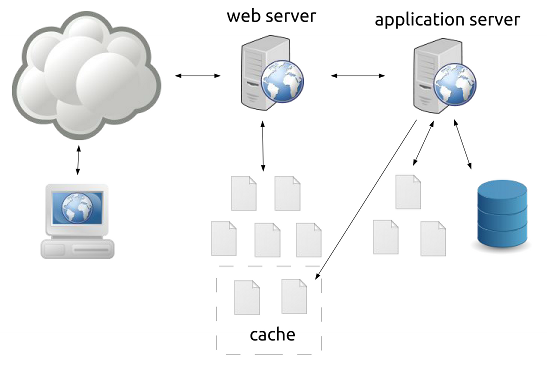
And here’s where page caching comes in.

web server with caching

Some applications allow page caching wherein generated pages are placed in a cache where they are treated as static files by the web server. Of course, treating these pages as permanently static files is a bad idea (e.g. a front page of a blog will change often) so a caching system can have many ways to modify the cache like setting an expiry date for pages or deleting the pages once something is modified in the content of the site.

Long story short, we installed W3 Total Cache on the site and we got this performance out of it:

bry-temp@webgeek:~# ab -n 1000 -c 20 http://webgeek.ph/devcup/
This is ApacheBench, Version 2.3 <$Revision: 655654 $>
Copyright 1996 Adam Twiss, Zeus Technology Ltd, http://www.zeustech.net/
Licensed to The Apache Software Foundation, http://www.apache.org/

Benchmarking webgeek.ph (be patient)
Completed 100 requests
Completed 200 requests
Completed 300 requests
Completed 400 requests
Completed 500 requests
Completed 600 requests
Completed 700 requests
Completed 800 requests
Completed 900 requests
Completed 1000 requests
Finished 1000 requests


Server Software: Apache/2.2.22
Server Hostname: webgeek.ph
Server Port: 80

Document Path: /devcup/
Document Length: 41120 bytes

Concurrency Level: 20
Time taken for tests: 0.578 seconds
Complete requests: 1000
Failed requests: 0
Write errors: 0
Total transferred: 41537000 bytes
HTML transferred: 41120000 bytes
Requests per second: 1729.69 [#/sec] (mean)
Time per request: 11.563 [ms] (mean)
Time per request: 0.578 [ms] (mean, across all concurrent requests)
Transfer rate: 70162.27 [Kbytes/sec] received

Connection Times (ms)
              min mean[+/-sd] median max
Connect: 0 0 0.3 0 2
Processing: 2 11 2.0 11 22
Waiting: 2 11 2.0 11 21
Total: 3 11 1.9 11 22

Percentage of the requests served within a certain time (ms)
  50% 11
  66% 12
  75% 12
  80% 13
  90% 13
  95% 15
  98% 17
  99% 19
 100% 22 (longest request)
bry-temp@webgeek:~#

(For those not familiar with ApacheBench, look at the “Requests per second” line.)

Being the chronic procrastinator that I am, I still haven’t upgraded the caching plugin for this blog. It’s still using the older WP Super Cache, which, combined with the smaller pages and using nginx over Apache, gives me these numbers:

bry@linode:~$ ab -n 1000 -c 20 http://blog.bryanbibat.net/
This is ApacheBench, Version 2.3 <$Revision: 655654 $>
Copyright 1996 Adam Twiss, Zeus Technology Ltd, http://www.zeustech.net/
Licensed to The Apache Software Foundation, http://www.apache.org/

Benchmarking blog.bryanbibat.net (be patient)
Completed 100 requests
Completed 200 requests
Completed 300 requests
Completed 400 requests
Completed 500 requests
Completed 600 requests
Completed 700 requests
Completed 800 requests
Completed 900 requests
Completed 1000 requests
Finished 1000 requests


Server Software: nginx/1.0.14
Server Hostname: blog.bryanbibat.net
Server Port: 80

Document Path: /
Document Length: 48651 bytes

Concurrency Level: 20
Time taken for tests: 0.204 seconds
Complete requests: 1000
Failed requests: 0
Write errors: 0
Total transferred: 48864000 bytes
HTML transferred: 48651000 bytes
Requests per second: 4890.93 [#/sec] (mean)
Time per request: 4.089 [ms] (mean)
Time per request: 0.204 [ms] (mean, across all concurrent requests)
Transfer rate: 233389.17 [Kbytes/sec] received

Connection Times (ms)
              min mean[+/-sd] median max
Connect: 0 0 0.3 0 2
Processing: 1 4 1.0 3 6
Waiting: 0 3 1.2 3 5
Total: 2 4 1.0 4 6
WARNING: The median and mean for the processing time are not within a normal deviation
        These results are probably not that reliable.

Percentage of the requests served within a certain time (ms)
  50% 4
  66% 4
  75% 5
  80% 5
  90% 6
  95% 6
  98% 6
  99% 6
 100% 6 (longest request)
bry@linode:~$

As I’ve said above, every application and platform has their own way of caching pages. For instance, Pangkaraniwang Developer uses Rails but I was still able to implement page caching for the lessons with ease.

bry@linode:~$ ab -n 1000 -c 20 http://pd.bryanbibat.net/
This is ApacheBench, Version 2.3 <$Revision: 655654 $>
Copyright 1996 Adam Twiss, Zeus Technology Ltd, http://www.zeustech.net/
Licensed to The Apache Software Foundation, http://www.apache.org/

Benchmarking pd.bryanbibat.net (be patient)
Completed 100 requests
Completed 200 requests
Completed 300 requests
Completed 400 requests
Completed 500 requests
Completed 600 requests
Completed 700 requests
Completed 800 requests
Completed 900 requests
Completed 1000 requests
Finished 1000 requests


Server Software: nginx/1.0.14
Server Hostname: pd.bryanbibat.net
Server Port: 80

Document Path: /
Document Length: 15114 bytes

Concurrency Level: 20
Time taken for tests: 0.186 seconds
Complete requests: 1000
Failed requests: 0
Write errors: 0
Total transferred: 15327000 bytes
HTML transferred: 15114000 bytes
Requests per second: 5367.95 [#/sec] (mean)
Time per request: 3.726 [ms] (mean)
Time per request: 0.186 [ms] (mean, across all concurrent requests)
Transfer rate: 80346.20 [Kbytes/sec] received

Connection Times (ms)
              min mean[+/-sd] median max
Connect: 0 0 0.2 0 1
Processing: 1 4 0.7 3 5
Waiting: 0 3 0.7 3 5
Total: 2 4 0.6 4 5
WARNING: The median and mean for the processing time are not within a normal dev iation
        These results are probably not that reliable.

Percentage of the requests served within a certain time (ms)
  50% 4
  66% 4
  75% 4
  80% 4
  90% 5
  95% 5
  98% 5
  99% 5
 100% 5 (longest request)
bry@linode:~$

Page caching can go beyond web servers and into the realm of web accelerators (e.g. Varnish) and distributed cloud-based solutions (e.g. CloudFlare).

To wrap things up, whenever I hear someone having performance problems in their primarily content-based website and hear some know-it-all say something like “You should’ve bought a bigger server!” or worse “You shouldn’t have used [language X] and [database W]! Everyone knows they don’t scale!“, I can’t help but facepalm.

Page caching won’t solve all your performance problems, but it should be among the first things you should look at (along with SQL profiling and data caching) whenever you find your websites frequently buckle under the loads they’re getting. Given that most page caching solutions don’t cost anything and can be done in less than an hour, there’s really no reason to try it out before doing anything drastic.

Baguhan Biyernes: Mga Kailangan Para Tanggapin Sa Trabaho

Madalas humingi ng mga “tips” ang mga estudyante kung paano sila makakapasok sa mga kumpanya. Ang problema, palaging mali-mali ang mga nakukuha nilang na abiso mula sa “nakakatanda”. Dahil dito, naisip kong ilista kung ano sa tingin ko ang talangang kailangan ng mga magtatapos ng kolehiyo para makakuha ng trabaho:

1. Tunay na kakayahan sa pag-program – Napag-usapan ko na ito noong nakaraang linggo. Maraming mga nakakatapos ng kolehiyo pero hindi marunong mag-program ng solusyon sa mga simpleng problema.

Bago ka mag-apply sa trabaho, siguraduhin mo munang mayroon kang kahit isang programming language na kaya mong gamitin sa isang high-pressure situation gaya ng interview. Mahirap na na mataranta sa gitna ng interview dahil lang kulang ka sa practice.

2. Passion for learning – Sa lahat ng mga bagay na makikita mo sa mga magagaling na programmer, ito lang talaga ang magagamit mo sa isang interview.

Hinahanap ng mga IT company ang mga taong gutom sa kaalaman kasi, una, sa bilis ng paglabas ng bagong teknolohiya, walang lugar sa IT ang mga taong tamad mag-aral (kung tutuusin meron: sa mga bulok na kumpanya). At ikalawa, magastos ang training: malaki ang matitipid ng kumpanya sa mga taong marunong mag-aral sa sariling sikap.

3. Marunong makaintindi at makitungo sa tao – Baka akalain ninyo na puro mga nerd lang na walang ginawa kungdi mag-program ang kailangan ng mga IT company. Pero kung ganoong klase kang tao, sa totoo lang, mahihirapan ka sa mundo ng IT.

Ang software development ay hindi tungkol sa programs o sa computers, ang software development ay tungkol sa tao.

Ang trabaho mo sa IT ay gumawa ng solusyon sa mga problema ng mga tao, mga problema na hindi nila lubos na naiintindihan pero kailangan mong alamin sa iba’t ibang paraan. At para gawin mo yung mga program at system na iyon, kailangan mong magtrabaho kasama ang iba’t ibang klaseng tao.

Kung hindi ka marunong makisama, hindi ka marunong makipag-areglo, hindi ka tatagal sa IT.

Kawawang mga nerd.

4. Kuneksyon – Mas madaling makakuha ng trabaho pag mayroon kang mga kakilala sa industriya.

Buti na lang sa panahon ngayon, napakaraming pagkakataon ang mga estudyante na makakuha ng mga kuneksyon sa industriya dahil sa mga tech-events. Nandyan ang DevCon na bumibisita sa mga kolehiyo para magbigay ng talk tungkol sa IT. Kung sinusubaybayan mo ang mga kumpanya tulad ng Google, IBM, at Microsoft, malalaman mo kung mayroon silang mga event na malapit sa inyo. Mayroon ring site tulad ng WebGeek na naglilista ng iba’t ibang events.

Pumunta ka sa mga event na ito para matuto at makakilala ng mga tao na makakatulong sa iyong makakuha ng trabaho. Wag lang sana maging rason mo yung isang nakasulat sa ibaba.

5. Portfolio – Hindi talaga kailangan, pero malaki ang maitutulong ng pagkakaroon ng isang portfolio sa simpleng dahilan na ang gumagawa lang ng mga portfolio ay yung mga matatapang na kayang ipakita sa mundo ang gawa nila. Karaniwan kasi itinatago ng mga tao ang code nila para “di manakaw” – pero sino naman ang magnanakaw ng pangit na code?

Gaya ng mga tech-events, sa panahon ngayon, maraming paraan para gumawa ng portfolio. Maraming mga libre at murang web hosting sites para sa Web Developer. Hindi ganoon kamahal maglagay ng app sa mga Apple App Store, Google Play, at kung anumang marketplace para sa mga Mobile Developer. At lahat ng developer pwede gumawa ng GitHub account at mag-upload ng kung anumang code na gusto nilang ipakita sa mundo.

Ngayon na nasabi na natin ang mga kailangan para matanggap sa trabaho, mararapat lang na banggitin na rin natin ang mga hindi ninyo kailangan:

1. Certificate – Iilan lang certificates ang talagang magagamit mo sa paghahanap trabaho. Walang disenteng kumpanya ang kumukuha ng tao base lamang sa certificate – kailangan nilang patunayan ng harapan kung ano ang kakayahan nila. Kaya nakapagtataka kung bakit hanap-hanap ng mga estudyante ang mga walang kwentang piraso ng mga papel na ito.

Masasabi nga natin na kabaliktaran sila ng portfolio: ang portfolio ay bunga ng buwan o taon ng pag-aaral at pag-eensayo, habang ang karaniwang certificate na linalagay ng mga estudyante sa kanilang resume ay galing lang sa pag-upo ng ilang oras sa isang seminar.

2. Diploma mula sa sikat na paaralan – Bilang isang nagtapos galing sa UP, sasabihin ko sa inyo ng diretso:

Maraming nagtatapos sa UP, Ateneo, at La Salle na di marunong mag-program.

Dalawa ang implikasyon nito. Una, kung nakapagtapos ka sa mga paaralang ito, hindi ka dapat maging kampante hanggang talagang napatunayan mo na marunong kang mag-program.

At ikalawa, kung galing ka sa isang di-kilalang paaralan, huwag mong isipin na di ka makakakuha ng trabaho sa IT na may malaking sahod (at hindi call-center). Basta alam mo ang kailangan mong gawin, di malayong malagpasan mo yung mga walang kwentang programmer sa mga “bigating” paaralan.

Baguhan Biyernes: Mga Idiom at Pattern

Madalas itanong ng mga may balak matuto ng programming kung ano ang kailangan nila para maging handa sila sa gagawin nila. Sa totoo lang, maraming magagandang sagot sa tanong na iyan:

Kailangan mayroon kang ‘passion for learning’.

Kailangan hindi ka natatakot magtanong o humingi ng tulong sa mas may nakakaalam.

Kailangan sanayin mo ang iyong ‘analytical skills’.

Para sa akin, mayroong isang magandang sagot na hindi ko gaanong naririnig kahit sa mga bihasa sa programming:

Kailangan matuto kang pumansin at makaalala ng mga pattern at idiom.

Kapag tinuturo ang programming sa mga baguhan, kadalasan ito ang paraan na ginagamit ng mga guro:

  1. Ituro kung paano gawin isang bagay
  2. Magbigay ng problema na kayang malutas gamit yung itinuro sa (1).

Ang problema dito ay tinatrato ng guro na pareho ang Math (kung saan nararapat ang paraang ito) at programming. Hindi sapat ang malaman kung ano ang mga bahagi ng mga program — kailangan mo ring malaman kung anu-ano ang mga posibilidad kung paano mo ibubuo ang mga program gamit ang mga natutunan mong bahagi ng program.

At ang mga kumbinasyon na iyon ay matatawag nating “pattern“.

Kunwari tuturuan mo ng iteration ang isang estudyante. Siyempre ibibigay mo sa kanyang pang-practice ay tung paggawa ng tatsulok na asterisk gaya nito:

*
**
***

Magtapatan tayo: sino sa inyo talagang nakakuha kung paano gawin ito ng walang tulong?

Mukhang simple siya — kasi simple nga siya basta alam mo yung pattern kung saan pwede mong gamitin yung counter sa nested loop:

for i <- 1 to 3:
    for j <- 1 to i:
        print "*"
    print "\n"

Dito natin makikita na hindi nga sapat ang pag-turo ng "basic concepts" lang sa programming. Kung tutuusin parang dinadaya nating mga guro ang mga estudyante pag hindi natin pinapakita at pinapaliwanag itong mga pattern na ito bago natin binibigay yung mga ganitong klaseng exercises o tests.

At sino naman yung mga nakakakuha ng tamang sagot?
Tama, yung mga may karanasan na sa programming i.e. yung mga estudyante na may kaalaman na tungkol sa mga pattern na ito.

Magbigay pa tayo ng isang halimbawa. Paano mo isusulat itong expression na ito?

kung ang pangalan niya ay Juan o Maria, gawin mo...

Pag tinuro mo lang ang konsepto ng boolean logic operators, malamang ang gagawin ng estudyante mo ay:

if name == Juan or Maria ...

Pero itanong mo sa kahit na sinong marunong mag-program, ang tamang code diyan ay:

if name == Juan or name == Maria ...

Isa nanamang pattern.

--

Kaugnay sa pattern ang mga idiom; pwede nating ituring na pattern lahat ng idiom.

Ang mga idiom ay mga pattern na madalas mong makita sa mga program na hindi ganoon ka-obvious para sa mga baguhan. Yung name == Juan or name == Maria natin sa taas ay isang halibawa ng idiom.

Kung tutuusin, pwede nating tawagin na idiom ang "=" operator sa mga programming language na gumagamit nito bilang assignment operator.

a = 100
b = 2
a = b

Para sa mga taong walang alam sa programming, walang saysay ang tatlong linyang iyan. Tinuro sa atin sa algebra na hindi pwede ang ganyan.

Subalit para sa mga developer, dahil iba ang ibig sabihin ng "=" sa ilang programming language, mayroon itong saysay at mayroon itong ginagawa.

Baka isipin ninyo "ang hina naman ng baguhan kung nalalabuan siya sa 'idiom' na iyan". Pero sige nga, subukan ninyo ngang intindihin itong Haskell code na ito:

a = do x <- [3..4]
       [1..2]
       return (x, 42)

Kung hindi kayo pamilyar sa Haskell, tiyak na malilito kayo sa ginagawa ng code na ito. Mukhang dapat madaling maintindihan yung do-notation o kahit man lang yung return, pero pag pinag-aralan ninyo kung ano ang ibig sabhihin ng mga idiom na yan, magugulat na lang kayo na malayo sila sa inaasahan ninyo.

Sa example na ito rin makikita na minsan binibigyan tayo programming languages ng mga paraan para isulat ang mga idiom. Halimbawa:

count++;  /* increment by 1 in C-based languages */
if 10 < x < 100:  # one way to range check in Python 

--

Hindi lang sa programming language nakikita at nagagamit ang mga pattern at idiom. Sa lahat ng level ng software development, mayroong mga patterns na sinusundan para mapadali ang

Halimbawa sa game development, lahat ng computer games gumagamit ng game loop:

while( user doesn't exit )
  check for user input
  run AI
  move enemies
  resolve collisions
  draw graphics
  play sounds
end while

Iba pang halimbawa ng patterns ay ang Model 2 at MVC ng web development, at Design Patterns ng Object Oriented Programming.

Sa madaling salita, mas mahalaga ang pag-aaral wastong paggamit ng patterns at idioms ng mga languages at platforms kaysa pag-aaral ng languages mismo.
Baguhan Biyernes: Bakit ang daming terminology na binabato sa iyo pag nag-aaral ka ng programming?

(Susubukan kong gumawa ng isang “weekly column” tungkol sa pag-aaral ng programming at software development. Bukod sa extra advertising para sa Pangkaraniwang Developer, mahahasa ko rin ang aking pagsusulat sa Tagalog.)

May isang magandang thread ngayong linggo sa r/learnprogramming kung saan nagrereklamo ang isang nag-aaral ng programming hinggil sa rami ng terminology na nakikita niya sa isang tutorial. To paraphrase/translate:

Isa akong baguhan na sinusubukang matuto ng jQuery, pero noong ini-introduce ako sa kanya ng kakilala ko, maraming lumabas na mga terminology na hindi ko alam sa 5 minutong usapan na iyon:

  • bind
  • delegation
  • node
  • handler
  • listener
  • event
  • bubbling

Ganito ba talaga kahirap matuto ng programming?!?

Pag binasa ninyo yung thread, madaling mahalata yung problema nung nagtatanong: hindi pang-baguhan ang jQuery, pero gusto parin niya itong matutunan kahit hindi pa siya bihasa sa JavaScript.

Gaya nga ng sabi ng ibang commenter, parang pumasok siya sa isang Calculus class kahit hindi pa siya dumaan sa Algebra at Trigonometry, at ngayon umaangal siya na hindi pinapaliwanag ng propesor ang sine at logarithm. Kaya nga may mga terminology tayo — hindi lang para hindi tayo magsayang ng oras sa pagpapaliwanag kung ano iyon, sa paggamit ng terminology, ipinapalagay na ng kung sinumang gumamit noon na maiintindihan na ng nakikinig/nagbabasa kung ano ang gusto niyang ipahiwatig kahit hindi siya simple.

Halimbawa, maraming pwedeng ibig-sabihin ang “node” kahit sa computer science, pero pag lumabas siya sa usapan tungkol sa jQuery, dapat naiintidihan ng lahat ng nasa usapan kung aling “node” iyon.

Sang-ayon ako sa huling payo ng mga commenter: dapat unti-untiin niya ang pag-aaral ng programming. Sa web development, medyo marami kang dapat matutunan bago ka mag-jQuery: HTML, CSS, at intermediate JavaScript. Hindi magandang sumabak sa isang tool o framework na ginawa para sa mga experienced developers kung ikaw mismo ay hindi experienced developer.

Pero kung tutuusin may punto rin naman siya. Hindi mo maiiwasan na dumiretso sa mga intermediate topics ang mga baguhan kaya mabuti kung mayroon kang mga paraan para mas mapadali yung buhay nila.

Kaya nga sa simula palang ginawa ko yung PD na may mga “Previous Lesson” links para malaman ng mga student kung ano yung mga kailangan nilang malaman bago nila pag-aralan yung current lesson. Balang araw, magkakaroon rin ng glossary of terms bawat lesson para hindi mahirapan ang mga student sa paghanap ng kanilang kahulugan. (Pero saka na iyon, tinatamad pa ako ;P)