Above is a video of me fixing my PS4’s DualShock controller. It’s 28 minutes long so here’s a write-up:
So I bought a second hand PS4 Slim last year just in time for Persona 5. Worked great in my first run through, but eventually the circle button of the controller stopped responding.
As with any DIYer out there, I applied the first aid for unresponsive electronics: opening the thing and liberally applying contact cleaner to everything. This would clean out the gunk and hopefully make the connections work again.
This worked, but only for a few days. The circle button stopped working even after multiple applications of contact cleaner. I spent about an hour tracing leads with my multi-tester before I found out that the connection for the button in membrane film was broken, probably corroded from a combination of heat and humidity.
After shelving it for a couple of months, I finally went to Ali Express and bought some spare parts: membrane film, and new ribbon cable to replace the cable I accidentally broke during the multiple teardowns. While I was at it, I also got other cheapdoodads for my PS4.
Replacement was straightforward. The only reason it took me about half an hour was my narration and relative inexperience in tinkering with controllers.
End result: I fully repaired the controller for about $30. It’s probably cheaper if I got it repaired in some random repair stall, but the extra spare parts and the experience more than made up for it.
And yes, the controller is still working. So far I’ve played over 60 hours on it while working on a 100% playthrough of Persona 5.
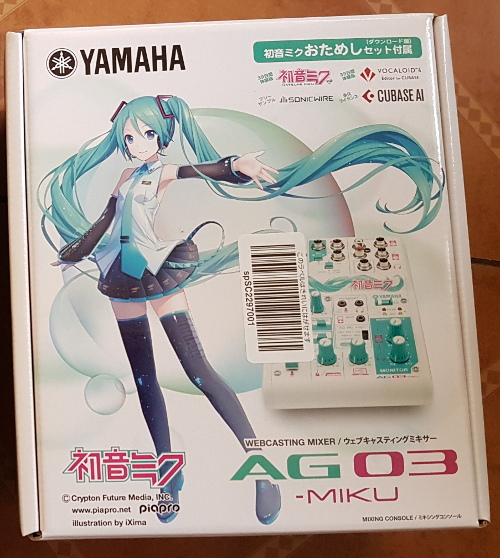
Riding on the bandwagon of people going out of retirement for Hatsune Miku‘s 10th birthday, I’m breaking my 2 year writing hiatus to write a review of the only Vocaloid merchandise I own – the Yamaha AG03-MIKU 3 channel audio mixing console.
Before we go into the review, a quick background on how I got to buy the device in the first place.
With the more stable income from my new job, I went on to upgrade the stuff I use everyday. Of course, upgrading my gaming rig was the first on the list, but a year on, there wasn’t really any new stuff I need to upgrade.
My setup then wasn’t bad – I’ve still got a decent Samson Go Mic USB condenser mic that I used way back for voice overs and other recording stuff. But it was getting close to Christmas and I had to spend a part of my bonus on something that I would actually use rather than spend on some other, more impractical impulse buy.
Mic was no problem – Audiophile sells legit Shure SM58s. The problem was USB audio interfaces.
Dedicated audio interfaces like those from PreSonus were too unitask-y for me, not to mention their huge markups from local sellers. For a couple of months, I had resigned myself to getting an the only “cheap” device I could find locally online: okay-ish Behringer mixers with USB out which go for ₱5-₱12K.
Then I remembered Game Grumps once made a video about their setup and revealed they were using a Yamaha mixer/USB interface, specifically the Yamaha MG12XU. This got me looking into locally sold Yamaha mixers, and in the process found out that they were selling hobbyist versions of their mixers – the AG Series.
But that was shut down when I found out that the this line wasn’t even on the local distributor’s radar. International shipping would also push the cost to > ₱10K. So back to Behringer again…
That is, until a random morning when I was searching for similar options to the AG series when I found out about the special edition AG03-MIKU – a Hatsune Miku themed AG03 promoted for webcasting. The cross promotion makes sense as Yamaha built the Vocaloid software, and without Crypton Future Media‘s Miku, Vocaloid wouldn’t have been as popular as it had been in the past decade. This tie-up also gives opportunities for aspiring producers and singers to make more Vocaloid material, benefiting both.
At first I dismissed it – the first page of search results for AG03-MIKU back then showed only Japanese stores (which are hard to navigate and probably don’t ship internationally) and Ebay listings with huge markups.
And they also offer international shipping. All in all, it only costs around ₱8K (₱6K for the item, ₱2K for the priority shipping), well under the ₱10K customs duty-free limit.
(Note: I still had to pay a deposit for the expected ~30% customs fee, but they refunded it later.)
And so I impulse bought yet another device that I may not use that often. I mean, it’s a well reviewed device (it’s essentially an AG03 with a Miku decal and a more vibrant Miku color scheme) and it ups my geek cred (Vocaloid is popular, but not quite poser-geek mainstream yet), but it’s got a limited use case i.e. to replace my old microphone with a setup that is 5 times more expensive in situations that only happen at most once a month.
Was it worth it?
Hell yeah.
Let’s start this review with the features that I bought it for: the mic input and the USB interface.
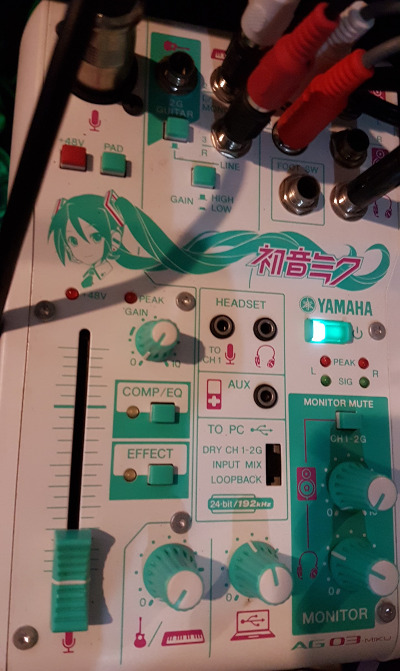
Unfortunately, there isn’t much to say about them. The mic input accepts both XLR and 1/4″ phone connectors in a combo socket, and supports phantom power for condenser mics in case I would like to upgrade/switch to AT2020. Without boring you about technical details, all the other knobs (like the gain/level) and buttons (like the PAD, COMP/EQ, EFFECT) all allow you to adjust the mic input to make you sound better, and they do their job fairly well.
The USB audio interface is just another (albeit very high quality) audio interface. Install the drivers and plug it in and it works. I can now use an XLR mic for Skype calls, game stream voice over, and karaoke sessions alone in my room.
An expensive, occasionally used setup. A perfect example of a self-Christmas gift.
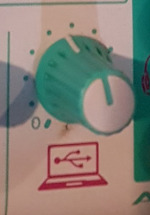
At least until I noticed this thing:
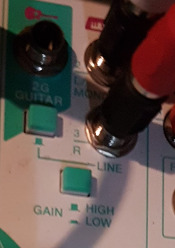
When you plug in the mixer and install the drivers, your computer can also treat it as playback device. That audio interface goes both ways, and this knob controls the volume of the sound input from your computer, and output it to the monitor headphones and/or speakers.
In other words, I accidentally bought a DAC, something that was also on my wish list. And trying it with my other Christmas self-gift an HD 600, the headphone output is powerful enough to drive the mid-to-high range headphones. So it’s also an amp, giving me a budget DAC/Amp for free!
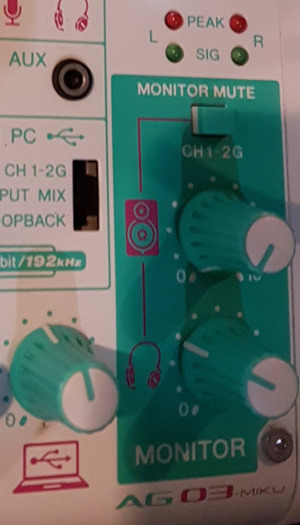
Headphones also lead us to the feature I use the most: the monitor knobs.
With these, I can adjust the volume of my speakers and my headphones independently. Having an analog knob for quick volume fine tuning is already a big thing, but that’s not the biggest use for me: it’s switching between speakers and headphones on the fly.
I have wide soft ears and I can’t wear headphones all the time. Even the lightweight HD 600 can become annoying after a while. So my default is lower quality speakers (I haven’t upgraded yet to studio monitors) when I’m just watching Youtube videos or quick games, and I used to switch to headphones when I’m listening to music or gaming seriously via the Windows audio settings. It’s a lot easier in Windows 10, but it doesn’t beat two quick flicks of knobs.
And finally, the last feature that I got to use extensively: the other 2 input channels.
Normally, a producer would use those two channels for musical instruments. I don’t know any instruments, but I found a good use for them: external audio input.
With 1/4″ to RCA adapters, I can connect the mixer to one of my karaoke machines. And with a 3.5mm TRS to RCA adapter, I can connect my PS4 (via the controller), my 3DS, and basically any device with audio to the mixer. Once connected, I can also adjust their volumes with the knob, saving myself the hassle of having to go to their respective volume settings and adjusting them.
—
Before we move on to the other features, let’s talk about the back connectors.
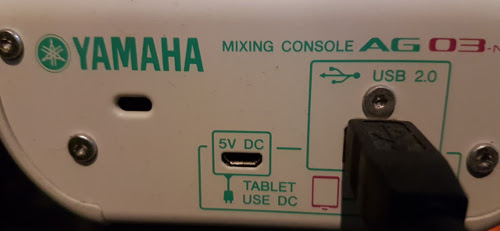
The USB type-B plug on the right is the main connector. It’s just USB 2.0 connection, but it’s more than enough to transfer audio at it’s maximum sample rate while at the same time powering the device.
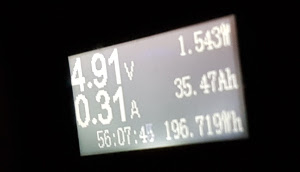
A quick check shows the mixer draws 1.5W while playing music and picking up audio, lower the max draw in the specs (2.5W).
Thanks to its low power draw, you have a portable mixing setup by powering it using a power bank and a micro-USB cable connected to the socket on the left.
(I actually did this in a Christmas party where they had a “bring your musical instrument for the jamming session”. As a vocalist, a mic with a preamp + mixer is my “instrument”. The end result was much better than I expected.)
With the correct cable and software, you can also use the type-B socket to plug in your iPad and record a jamming session. But I don’t have the proper cable and I’d rather use a laptop for it anyway.
—
Now on to the features I don’t use.
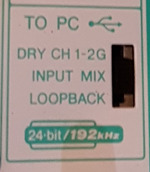
This toggles how the device mixes the audio. The Dry sends the audio from the channels dry (ie. not mixed and not affected by the volume level setting), Input Mix sends the mixed audio that you hear in the monitors sans the computer sound, while Loopback also mixes in the computer sound (everything you hear in the monitors is looped back so it’s more accurate, but may cause feedback in some software/setups). I generally just leave this in Input Mix or Loopback.
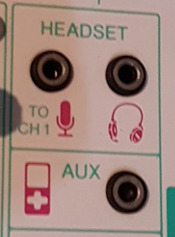
You can use the first 2 sockets you have a headset with mic that have split connectors, and you can use the last socket for input from any audio device. I don’t use these sockets because the other sockets can do the same and are better – the headset sockets are inferior to XLR in and monitor outputs, and the you have no knob to control the AUX volume and it is just line level.
I also don’t use the bundled and downloadable software. Sure there’s the Cubase AI audio software license and the 39 day license (a Miku pun for the uninitiated) for Vocaloid and Miku, but my audio software is enough for my needs right now. Then there’s the software to setup COMP/EQ and sound effects which I just set to presets (COMP/EQ for male vocalists, hall echo effect).
The only software I had to tweak was the USB driver to lower the sample rate (192kHz is overkill) which also reduces the latency (it’s impossible to sing when latency is too high, but that’s for another article).
—
Final verdict:
It is what it is, a webcasting starter kit. Pair it with decent mics, instruments, and musical talent and you’re now ready for YouTube / NND. Pair it with OBS and a console or gaming rig, and you’re set to be a Twitch streamer. And if you don’t have a DAC yet and want clean sound, it can easily fill in for one.
That said, it’s a jack of all trades, and it carries the usual drawbacks. For example, if you’re just in it for voice over work, it would be better to find a cheap audio interface or a decent second-hand interface. You can also get mixers with > 6 channels for far less than ₱8K if you just want a mixer. And if you want really good DAC/Amps, you can get much better ones for a few thousand Pesos more.
Overall, I’d recommend this product. Just go with the plain AG06 if you don’t want to look like a weeaboo.
Two weeks ago, I challenged myself to make a game that features pattern recognition and numbers. After a week of thinking up of ideas, coding, public testing, and tweaking, here’s the result:
(Disclaimer: This post features somewhat stronger opinions that the usual so I have to be clear that while I manage the programming competitions in DevCon, the sentiments in this post do not represent the organization’s.)
Algorithm/Programming Competitions: the other type of “Hackathon”.
When you see the word “hackathon” nowadays, it refers to the one where a bunch of people are gathered into a single venue and form groups to work for a couple of days on ideas that they pitched at the beginning and end with a final pitch to see how good their prototype and idea is. Best pitch wins.
On the opposite end there’s the original OpenBSD type of hackathon. People are still gathered in a single venue, but there is no pitching – just coding. It can be a directed coding venture, like in the first hackathon where they worked on some parts of the OS. It can also be a creative, free-form one, like Global Game Jam where game developers make any game for 48 hours as long as it’s somehow related to the theme.
There can also be prizes in the latter, but it’s mostly a fun exercise for developers. And there’s no business stuff and pitching to worry about.
Programming Competitions have nothing to do with these two. It’s only because hackathons have become somewhat famous spectacles recently that people think that “get programmers in a single venue and make them code” automatically makes it a “hackathon”.
A programming competition is a race. First team to make programs that can solve the contest problems wins – it’s as simple as that. No pitching. Strict rules. And a lot shorter than most hackathons.
—
I believe that Programming Competitions have the most potential out of these three programming events…
Programming competitions are an objective test of programming skill. If your program doesn’t solve the given problem, you won’t get a point for it.
Compare this with college. As weird as it may sound, you can graduate with an IT-related degree without knowing how to program, whether through deception or through plain incompetence of the school. And this happens more than we’d like in the industry.
Let’s imagine programming competitions somehow become famous throughout the country in a few years time. Not basketball-level fame, but maybe soccer-level. Say there’s a persistent online Philippines-only HackerRank-like competition where anyone from the top-tier universities down to the remote colleges can test their skills. Assume that the anti-cheating and user-verification measures are good enough that graduates can put their “programmer level” on their resumes and that employers will honor it.
Imagine what would happen if students are confident of their programming skills that some of them even show them off. Imagine its impact in the industry and the academe.
It’s going to be a crazy world, won’t it?
Certainly a bigger impact than what the other hackathons can do.
—
…but given what we have right now, there’s very little chance that potential will be reached.
The opportunity is there, but there are hurdles that may be too much for anyone interested in taking it.
First problem: no one cares.
Just a quick background: I’m not a competitive programmer. I solved programming problems (Project Euler, topcoder archives) back in college just for fun. I never practiced for or competed in any live event other than the odd Google Code Jam where I never intended to pass multiple rounds.
But I understand the importance of testing students for their programming skill. After the DevCon Code Challenge Cup, I decided to code a quick online judge in Rails and in mid-2013 started to hold mini-programming competitions in various schools around the country. You can try out a demo here.
And after 2 years of doing this, I’ve had a couple of striking revelations.
One of those was how little people cared about programming. Sure, the people who invited us were really grateful to have the opportunity to test the programming skills of their students, but very few of the organizers were curious about the problems given to the contestants. I would understand the hands-off approach if they were school administrators, but many of those who invited us were IT students and teachers.
None of them reviewed the problems before I gave them to the contestants, checking if the problems were too easy or too hard or simply out of scope of their curriculum. Only a couple of them asked me about the problems after the contest even though that would have been the best time to ask for advice to improve their programming skills.
And there you go, the reason why we’re churning out weak IT graduates: the people in position don’t care about things that they should be passionate about.
The previous problem is compounded by the problem at the other end: a lack of understanding of the relative skill levels of programmers.
Programming isn’t a sport, it’s a skill and a craft. It’s not easy to gauge programmers and we are left to use vague terms like “beginner”, “skilled”, and “expert”.
And anyone who conducts a programming competition to non-competitive programmers will see that “beginner” is not adequate for describing college students. They’re all beginners, but the difference between their skill levels can be great.
Yes, that’s a euphemism for “college students suck at programming”.
Go to the demo link above and read the problems (if it’s still in Practice mode, wait until the Contest mode starts). Even though the problems can be answered by anyone who has just taken CS classes on Java programming and algorithms, in our experience only students from the big 3 universities were able to consistently answer more than 7 questions within the time frame. The next tier of universities can answer around 5, while the rest even struggle with 3.
If aren’t a programmer and don’t know how easy it is to answer just 3 in that list of problems, let’s just say anyone taking a good Programming 101 class should be able to do that in 4-5 lab sessions.
So yeah, most college programming classes are horrible. If you’re going to hold an open (non-invite only, non-ACM-ICPC) programming competition today, you ought to lower the difficulty of the questions. Otherwise, many of your contestants will get very low scores.
You don’t want that to happen. Put yourself in the shoes of someone who either was just curious or was pressured to join the contest. What will they think when they leave the event getting only one or two correct? Will they look forward to the next competition? Will they help promote future events?
Maybe, but probably not.
Even now, I still occasionally get cases where contestants get depressingly low scores (especially if I’m not familiar with the school). We’re lucky that the contests are confined within the schools so we don’t need to worry about negative publicity, but this brings up another point: unless you’re like me who can conduct more than one contest a month, most programming competition organizers do not have the experience of holding contests on a regular basis to learn from their mistakes.
Combine all these three points and you’ll have an idea what will happen when someone conducts an open programming competition in the same manner as the other hackathons.
Venue, logistics, sponsorships… no problem. Then they’ll find people who had past programming competition experience to be the judges and write the problems for them. But since it’s the first time for all of them, the judges will write difficult problems and the organizers will not look at the problems.
Fast-forward to the end of the event. Many teams joined, but only a few of them were competitive programmers. One of the latter won, and the rest were left with a score of 1 or 0.
There won’t be any negative PR (it’s not like it was a bait-and-switch), but there won’t be enough positive buzz either to make a bigger and better follow-up event. Instead of spreading the word and encouraging more people to join in the future, many will just go home and say “eh, at least I tried” and leave it at that.
On to the final point.
When you’re in my shoes as someone who has programmed over half of my life (a good chunk of that professionally) and as someone who recently has conducted programming competitions, you’ll come to hate programming competition-level problems.
I hold programming competitions in schools to show students that they need to understand their programming skill level and work on improving that to the point that they are comfortable with it even under pressure. This is the skill that I want to cultivate into students, and it will do well for them as they enter work.
But there comes a point where the problems are just too tricky that it’s no longer a test of programming skill, but a test of knowing trivia from Computer Science and Math that you will almost never get to use in the industry.
Simply put, high level programming competition skill does not equate to high level software development skill.
High level programming competition also relies on quick hacks – computationally efficient, but ultimately ugly kludges. Good Software Engineering requires you to avoid these hacks lest they become technical debt that will cripple your system and your team in the long run.
Another thing, the deeper you are into complicated problem solving, the more prone you are to The Complicator’s Gloves.
This pitfall of forgetting the original goal of having open programming competitions can be avoided as long as your organizers and judges are developers from the industry whose years of experience have removed any romantic feelings for CS trivia in favor of more pragmatic approaches to software engineering. But then again, there are far fewer CS/SE hybrids (i.e. well versed in both) in the local scene than Developer/Designer “unicorns” so good luck finding them.
—
Long story short, Programming Competitions are one of those things that look great on paper, but immediately reveals why no one does it the moment you try to do it on your own. (see also: local Developer Bootcamps)
Can anything be done to address the problems above and push these contests forward and take Philippine IT students’ skills to the next level?
Of course. But it’s going to take a much more dedicated and passionate group of people than what we have right now.
I just finished the months long processing of the RubyConf Philippines 2015 videos so I guess it’s a good time to do an article on covering tech events as an amateur.
As far as I know, I’m the only amateur videographer in the local tech/developer scene. All other videos of events are either taken by camera phones or are done by paid professionals. Compare this with photography: there are still camera phone pictures, but many events have amateur photographers with decent gear. Why is this so?
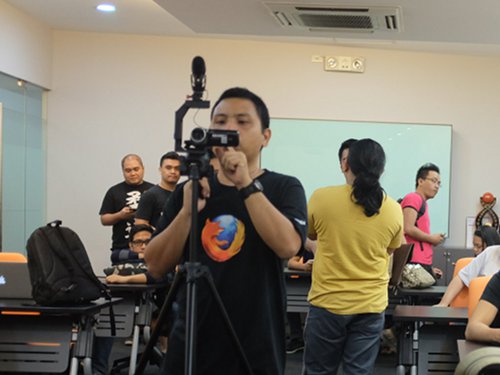
It’s not because videography is expensive. Yes, if we look at the equivalent video cameras for DSLRs, you’ll get into the P50k+ range. But you can get somewhat decent cameras for much less like the point-and-shoot equivalent that I use. Overall, my current gear is cheaper than a typical hobbyist photographer’s gear; even the “pro-level” device, the RØDE VideoMic Pro, just hovers around the price of typical lenses.
If amateur videography isn’t expensive, why aren’t we seeing more people taking videos of events?
It’s simply not fashionable.
No, this isn’t a dig at camera owners who use their devices as status symbols. It’s just the blunt truth: videography takes way too much effort compared to photography.
Let’s look at what happens when you cover a meetup talk – the most basic thing a tech event videographer will record.
First you’ll need to deal with the hassle of having to bring a tripod to the venue as the crappy ones that fit in your bag won’t be stable enough for taking videos.
Then you’ll have to sit in a corner for the entire talk… if only that was that easy. You can’t just sit there playing with your phone or move away and chat with the people in the back. You have to focus the whole time, sometimes you’ll have to pan towards the speaker, other times you’ll have to zoom to the projected code. The worst part is that you can’t even speak or comment or heckle because it’s going to be obvious in the audio (watch the RubyConf lightning talks for some examples where I stopped caring about it).
Speaking of audio, it’s a whole different beast compared to videos/images. You can’t fix it in post production, and if you don’t have external microphones like my shotgun mic, you’ll have to place your camera much closer to the speaker to lessen background noise.
Then there’s the post production. Fortunately for talks, it’s just trimming off excess video and possibly re-encoding to get a smaller sized video for a faster upload.
Finally the upload. Hope you’ve got good broadband like mine. If not, you may have to do what I did before PLDT fixed the line in my area and shove the videos into a netbook (to save electricity) and let it upload all day.
And that’s just a user group meetup talk. What about more complicated events like a developer conference?
First you’ll need more cameras: one for the projector, and another for the speaker. Panning between the two isn’t good enough. You might even need a third camera taking a wide shot for backup purposes.
The audio is also slightly more complicated here. Having a shotgun mic really improved the quality of the audio in my usual videos but it alone isn’t enough to get good audio – I ended up not using the shotgun mic audio in the RubyConf videos and instead used the backup camera audio because the latter was in a better position to pick up the speaker and audience audio.
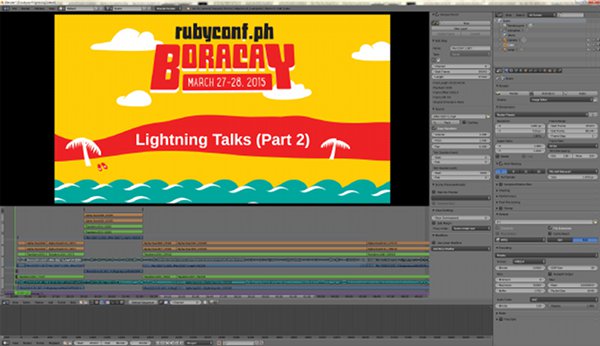
RubyConf PH’s video post-production was much more complicated, though. I got over 150GB of video which, over the course of 3 months, I converted and stitched together to make 21GB of 720p video. I don’t have plans to purchase professional video editing software so I had to make do with Blender VSE, which unfortunately is single-threaded when rendering the final video. Hence the 3 month delay.
tl;dr:
Hand over a camera to a random person and ask them to take pictures of an event and many will be happy to do that for you.
Hand over a video camera and tell them to cover an entire talk (not just random B-rolls) and they’ll give up less than 5 minutes in.
—
In case you’re wondering what a professional setup looks like, here’s what Confreaks uses when it records conferences:
1 – Manned HD camera (used for primary speaker(s) coverage)
1 – Wide shot HD camera (used for backup and synchronization with slides)
1 – Backup slide camera
1 – Hi-res slide recorder that goes in between the presenter’s laptop and the projector (records hi-resolution output of exactly what is seen during the presentation, including slides, videos, live coding, etc.)
1 – Audio recorder that takes an auxiliary out from the house sound system to provide a crisp, clean audio track
This brings up another requirement for video coverage: manpower. Not only does a professional setup require expensive equipment, it also needs at least 2 operators to work properly.
I’m still surprised that I was able to pull off RubyConf PH on my own with what little gear I had with only minimal problems.
—
This article’s already a bit long but I still haven’t covered one common comment I hear in the local tech scene regarding videos:
“I hope someone streams this event.”
To which I just shut up instead of explaining why this makes me ಠ_ಠ internally.
First off, you need at least 2Mbps for good quality streaming. Most venues do not have those speeds.
Then there’s the camera. If you want decent video for your event, you’ll need a $200+ video capture device that you would connect to your video camera. Don’t have one? You’ll have to settle with webcams then.
Even if you skip both, being ok with crappy webcam video and occasional lag, you still have the real main problem:
Nobody is watching.
Try to watch streams of events and you’ll see that even the biggest local tech (i.e. non-mainstream) events get less than 50 viewers. Once you realize this, you shouldn’t be surprised that I don’t bother with all the effort to stream events.
—
So to sum it up, videography is hard; everyone says they want video coverage, but in the end no one really watches videos.